Google renewed the agreement with Mozilla with 10 billion which makes Google the default search engine on Firefox. This price is much higher than the last agreement in 2008 and now Google's Chrome takes larger share than Firefox. So why Google pays so much money to Mozilla which is also a competitor of Google? Read this article and you will find the answer.
To Make Google as the default search engine, Google and Mozilla will renew the cooperation agreement at around 10 billion USD. In the case of haveing their own web browser "Chrome", Google's cooperation with Mozilla is understood as a kind of support to their competitor with their money. But Why?
On one hand, Firefox still has millions of users and this agreement means that millions of users will use Google as the default search engine when they are using Firefox. And using Google to search means Google can display ads and that means money to Google.
But 3 billion per year, that is 3 times more than the price in the agreement they signed in 2008. What's interesting is that Google released Chrome after they signed the agreement in 2008. From a common point of view, with the raise of the Chrome's share in web browser market, they should reach an agreement at a lower price. Although Firefox still takes up 1/3 of the web broswer market, their share is going down and the reason is Chrome.
Chrome is like a beast in the market of browser, it is swallowing the share of IE and also Firefox at the same time. Actually, according the the data from StatCounter, Firefox's share in browser market is lower than 2008. Think about it. Aug, 2008, 26.08% of people were using Firefox as their browser, 68.91% were using IE and at that time, Chrome was not released by Google. Last month, 25.23% of people were using Firefox as their default web browser and 40.63% of them were using IE. Chrome took 25.69% of the market. It's true that more people are choosing Chrome as their default web browser than choosing Firefox.
So Google will pay 3 times money, while Firefox's share in browser market is lower than 2008. Why they do that?
The first reason comes to my mind is the competition. Because of the bid. Microsoft wants Bing become the default search engine of Firefox. And it is really interesting that Yahoo also takes part in the bid and Yahoo's search engine is from Bing. So one reason is that Google spend money to let Microsoft and Yahoo out of the game. It's possible.
Microsoft spends billions of USD to try to compete with Google in search engine market. One of the result of this is that Google and Bing swallow Yahoo's share in search engine market together. Now Bing provides the result of Yahoo's search engine, so Bing hurts itself. Nowadays, Bing and Yahoo take the same percent of the search engine market share and Bing is paying this. Here I have to say that Bing and Firefox's cooperation is do useful to Bing. Let's say that Bing know that and when they talking about the cooperation, they are not cheapskate, but they are not that generous and will pay 3 billion a year. Because from the market share, 3 billion is a little crazy.
So why Google still pay this high price to Firefox? Analyst said that compare with the income from displaying ads through Firefox and competition with Bing, avoiding the problem of anti-monopoly after Chrome's share continue growing is the real problem Google cares.
It's not crazy, actually if now it is not the reason, it will be the reason in future. So far, it is relatively safe for Google's browser market in anti-monopoly. They are not like Microsoft and Apple, Google can not control the default browser in any kind of operation system. However, the problem will become more and more serious with the large download of Chrome from google.com and the success of Chrome OS. I think there will be a larger pressure from mobile devices. Now, web browser on Android devices looks like a normal browser, with more and more element from Chrome are added to it. It will become the real Chrome some day.
That means Google has a dominant operation system (Android) to promote their web browser. That will bring investigation from anti-monopoly just like Microsoft few years ago. But if Google pays money to support Mozilla and Firefox, it's another question. Let's wait and see.
2011年12月31日星期六

2011年12月30日星期五
Apps Now Is More Powerful Than Media?
App has dominated the world. If you do not agree with it, I'll prove it. iPhone now reaches 123 countries and regions. Of course, if you use iPhone, you are using iPhone app. Just like internet, now app are used every corner of the world.
However, media, including books, music, movies, are used much less than apps. Just look at Apple, report said that only 51 countries and regions can purchase music through iTunes and 6 countries and regions can purchase TV show on iTunes.
There are many limitations in traditional media area, especially in TV and Movies. And every channel customes their own rules(Cinema, Pay to watch, DVD, Cable TV and Internet Streaming Media). iTunes' music and video and all the music and video on the internet's limitation on geographic shows that there's still a long way to go to make a legal market of digital media all around the world.
There is one way that can do that: app. It presents the future of media. App is media. Just like games and software are regarded as media, app is also a kind of media. Not only that, it now a swallow other forms of media little by little.
We first experience this kind of "software swallows media" is Book. The best book on iPad does not only provide iBook and Kindle version, but also provided as standalone app. All the best child book on iPad are apps with full function. They all integrate pictures and video in the user experience.
"Tin Tin" on iPad is a perfect example of this. It is adapted from a carton movie, in which integrates 3D model and 360° room to let readers to feel that you are in the story. Music and movies are relatively passive experience, but they now in apps and become one of the funcion in an app. With the more and more media are integrated into apps, software and media's boundary is now much fuzzier than ever before.
This trend first appeares in production areas, more and more music, video and movie are produced by iPhone. Apps that can integrate music and video are much more than before. Before we enter the next era, we need a lone time of upgrading. Think about it. Nowadays, how the whole media content is spreaded by app? No matter people enjoy the media through Spotify or watch movies with iPad through netflix, the music and movies do not change anyway. It just provides much better user experience.
If you want to promote a music or a TV show and make it popular among people, you can put them on Facebook and Twitter and millions of people will share it and your music or TV show will really really popular. You do not need to spend millions of USD to promote it on radio or TV.
The apps that provides this kind of media will influnce our consumption habits very much. Apps will help us to find media through SNS and bring them to TV, iPad, speaker and other devices. They do that without a set-top boxes, radio and book store and they make you spend your money with app. Every media compay must pay attention to this or they will be in trouble.
Total Video Converter iPhone Ringtone Maker
However, media, including books, music, movies, are used much less than apps. Just look at Apple, report said that only 51 countries and regions can purchase music through iTunes and 6 countries and regions can purchase TV show on iTunes.
There are many limitations in traditional media area, especially in TV and Movies. And every channel customes their own rules(Cinema, Pay to watch, DVD, Cable TV and Internet Streaming Media). iTunes' music and video and all the music and video on the internet's limitation on geographic shows that there's still a long way to go to make a legal market of digital media all around the world.
There is one way that can do that: app. It presents the future of media. App is media. Just like games and software are regarded as media, app is also a kind of media. Not only that, it now a swallow other forms of media little by little.
We first experience this kind of "software swallows media" is Book. The best book on iPad does not only provide iBook and Kindle version, but also provided as standalone app. All the best child book on iPad are apps with full function. They all integrate pictures and video in the user experience.
"Tin Tin" on iPad is a perfect example of this. It is adapted from a carton movie, in which integrates 3D model and 360° room to let readers to feel that you are in the story. Music and movies are relatively passive experience, but they now in apps and become one of the funcion in an app. With the more and more media are integrated into apps, software and media's boundary is now much fuzzier than ever before.
This trend first appeares in production areas, more and more music, video and movie are produced by iPhone. Apps that can integrate music and video are much more than before. Before we enter the next era, we need a lone time of upgrading. Think about it. Nowadays, how the whole media content is spreaded by app? No matter people enjoy the media through Spotify or watch movies with iPad through netflix, the music and movies do not change anyway. It just provides much better user experience.
If you want to promote a music or a TV show and make it popular among people, you can put them on Facebook and Twitter and millions of people will share it and your music or TV show will really really popular. You do not need to spend millions of USD to promote it on radio or TV.
The apps that provides this kind of media will influnce our consumption habits very much. Apps will help us to find media through SNS and bring them to TV, iPad, speaker and other devices. They do that without a set-top boxes, radio and book store and they make you spend your money with app. Every media compay must pay attention to this or they will be in trouble.
Total Video Converter iPhone Ringtone Maker
2011年12月28日星期三
Experience Sharing: Ten Steps to Perfectly Jailbreak Your iOS 5.0.1
On July 26, 2010, the Library of Congress officially repaired several exemption clauses in the Digital Millennium Copyright Act and it formally recognized the legitimacy of the IOS jailbreak.
Jay Freeman,the founder of Cydia, Jailbreak software community, said about 10% of the global iPhones had escaped.
Now the redsn0w 0.9.10b1, which can perfectly jailbreak iOS 5.0.1 has just released. Currently, it supports iPhone 3GS, iPhone 4, iPhone 4 CDMA edition, iPad 1, iPod touch 3G, iPod touch 4G. However, the iPhone 4S, iPad 2, using A5 processor still can not escape.
Please check the device Settings - > General > On the Machine to inspect equipment running on the firmware version, if you are running older versions of the firmware, you will update it to the 5.0.1 then jailbreak.
Step 1, Download redsn0w_win_0.9.10b1, then Decompression attachment and open redsn0w.exe
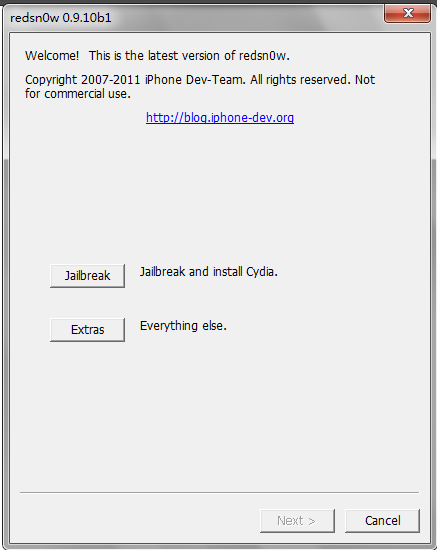
Step 2, Click the “Jaibreak” button on the map
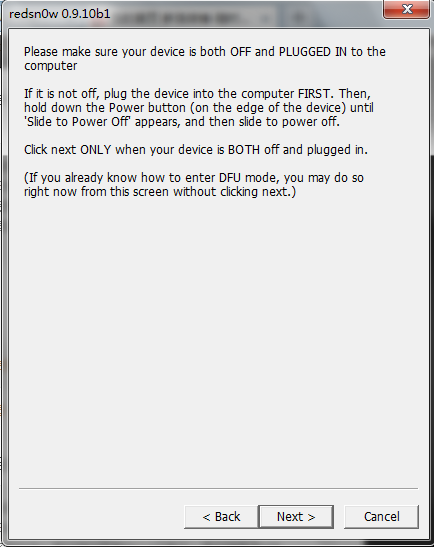
Step 3, Make sure your iOS device is switched off, and the data line is connected to a computer.
Step 4, During the Jailbreak process, you need first enter DFU mode. The concrete operation process has three steps. First, hold the key for several seconds. After the prompt field grey, go to the next step.
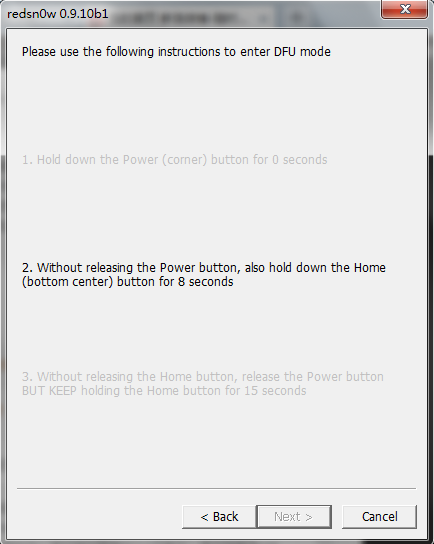
Step 5, After that, don't let go the open key, and also hold down the HOME key for 10 seconds.
Step 6, Release the open key, but continuing to hold down the home key for 15 seconds
Step 7, If you succeed, there will be a progress bar.
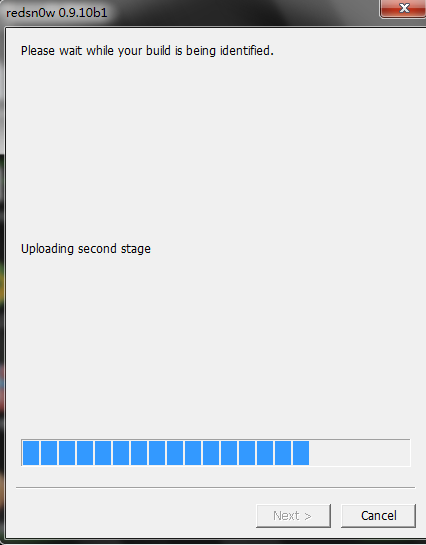
Step 8, If the following interface appears, select the" Install Cydia" to start installing the Cydia to iOS equipment.
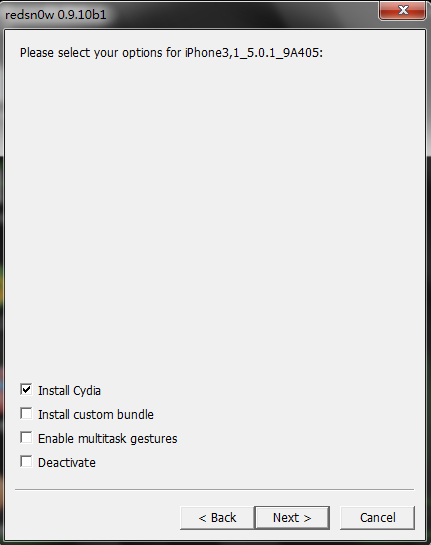
Step 9, After a while, your iOS device appears English covering the screen, this demonstrates file uploading.
Step 10, Two or three minutes later, your mobile phone will reboot, and you can see the Cydia Icon
Finally, I say one more word: although the jailbreak can bring you some new functions, it may also lead to the instability of the system, power consumption increasing, etc. So think twice and then make the decision according to your needs.
iPad ConverteriPad Converter for Mac .
2011年12月27日星期二
Video Format Total Solution: How to Convert and Edit Video on Windows/Mac
DigiTimes reports that Intel has notified partners that the company will "fully release" its Thunderbolt technology in April 2012. Intel is reportedly preparing to launch Thunderbolt-supported motherboards, notebooks and desktop PCs at that time.
Intel and Apple originally partnered on the new technology which has become standard across Apple's MacBook Pro, MacBook Air, Mac mini, and iMac. Digitimes reports that the cost of Thunderbolt technology is expected to drop in the second half of 2012, allowing more widespread adoption.
While Apple does offer Thunderbolt across most of its product line, the first Thunderbolt products have been limited to relatively high end devices. More widespread adoption should help drive adoption by accessory makers that will benefit both Mac and PC users that use Thunderbolt.
Intel has always said that they see both USB 3.0 and Thunderbolt as complementary technologies and plans to support both in their 2012 motherboards.
More and More video formats are coming out with different video encoders and it makes our spare time more and more colorful. However, it is not to say that there is no problems. Actually, different video formats make it difficult to share video with others, even your own camcorder and iPod. Is there an easy way to convert videos effectively. Yes, there is.
In this article, I will show you guys how to convert videos on windows and mac.
Part 1. How to Convert and Edit Videos on Windows
For Windows users, you need a Video Converter to do that for you.
Here I use Aiseesoft Total Video Converter
Step 1: Download and install Aiseesoft Total Video Converter
After you download it to your computer, double click it and it is really easy to install.
You just need to click “next” and it will complete it in seconds. It will automatically run after installation.
Step 2: Load Video
Click “Add File” to find the video that you want to convert and click “open”. It will be loaded automatically.
Step 3: Select the target to decode
In the “Profile” drop download list you can find your target according the usage of your output video, such as if you want to put the video on your iPod touch, you can select the “iPod” in the first list and “iPod touch 2 MPEG-4 640*480(*.mp4)” in the second list.
Step 4: Set Advanced Parameters
After you select the right output profile, you can click “setting” button to set your advanced parameters. You can adjust video and audio settings separately. In video section, you can change “video encoder”, “resolution”, “frame rate”, “video bitrate”In audio section, you can change “audio encoder”, “sample rate”, “channel”, “audio bitrate”If you want to save this profile and settings and use it next time you can click “save as” button to give a name to it. And the next time you want to use it you can find it in the profile list named “user defined”.
Step 5: Choose a Destination
To browse and find a output folder for your output files or just the default one.
Finally, Click “Convert” button to begin your conversion, here in the converting
interface you can choose “shut down the computer when conversion complete” or “open output folder when conversion complete” or you just do not choose neither one.
Tips: How to Edit the Output Video
This video converter is also a video editor, you can use it to edit your output video as follows:
1. Effect:
You are allowed to adjust the “Brightness”, “Contrast”, “Saturation” and you can choose the “deinterlacing” to make the video more enjoyable.
2. Trim:
In “Trim” section you can pick up any part of the video to convert.
There are two ways to select the part of the video you want. One is set the start and end time in the box. The other one is to drag the start and end button in the processing bar.
3. Crop:
This function allows you to choose a certain play area to convert. That means you can choose a part of the screen you like to convert. For example, you just like the tv in the middle of the screen, then you can drag the frame around the preview window to select the tv and the output preview will show you the output video.In this section you can also choose the “zoom mode”, such as “keep original”, “full screen”, “16:9”, “4:3”.
4. Watermark
In the section, you can add a watermark on the output video to show people something, such as your name, website, studio name or other things. The watermark could be words and picture. You can adjust the transparent of the watermark easily to make it more beautiful.
Part 2. How to Convert Video on Mac
This time you need a Video Converter for Mac
Step 1: Add File
Click “Add File” button to load the video you want to converter
Step 2: Choose profile and adjust settings
You can find your output video format from a drop-list called “Profile”You can also adjust the specific settings of the output video, such as “Resolution”, “Bitrate”, “Encoder” and so on.
Intel and Apple originally partnered on the new technology which has become standard across Apple's MacBook Pro, MacBook Air, Mac mini, and iMac. Digitimes reports that the cost of Thunderbolt technology is expected to drop in the second half of 2012, allowing more widespread adoption.
While Apple does offer Thunderbolt across most of its product line, the first Thunderbolt products have been limited to relatively high end devices. More widespread adoption should help drive adoption by accessory makers that will benefit both Mac and PC users that use Thunderbolt.
Intel has always said that they see both USB 3.0 and Thunderbolt as complementary technologies and plans to support both in their 2012 motherboards.
More and More video formats are coming out with different video encoders and it makes our spare time more and more colorful. However, it is not to say that there is no problems. Actually, different video formats make it difficult to share video with others, even your own camcorder and iPod. Is there an easy way to convert videos effectively. Yes, there is.
In this article, I will show you guys how to convert videos on windows and mac.
Part 1. How to Convert and Edit Videos on Windows
For Windows users, you need a Video Converter to do that for you.
Here I use Aiseesoft Total Video Converter
Step 1: Download and install Aiseesoft Total Video Converter
After you download it to your computer, double click it and it is really easy to install.
You just need to click “next” and it will complete it in seconds. It will automatically run after installation.
Step 2: Load Video
Click “Add File” to find the video that you want to convert and click “open”. It will be loaded automatically.
Step 3: Select the target to decode
In the “Profile” drop download list you can find your target according the usage of your output video, such as if you want to put the video on your iPod touch, you can select the “iPod” in the first list and “iPod touch 2 MPEG-4 640*480(*.mp4)” in the second list.
Step 4: Set Advanced Parameters
After you select the right output profile, you can click “setting” button to set your advanced parameters. You can adjust video and audio settings separately. In video section, you can change “video encoder”, “resolution”, “frame rate”, “video bitrate”In audio section, you can change “audio encoder”, “sample rate”, “channel”, “audio bitrate”If you want to save this profile and settings and use it next time you can click “save as” button to give a name to it. And the next time you want to use it you can find it in the profile list named “user defined”.
Step 5: Choose a Destination
To browse and find a output folder for your output files or just the default one.
Finally, Click “Convert” button to begin your conversion, here in the converting
interface you can choose “shut down the computer when conversion complete” or “open output folder when conversion complete” or you just do not choose neither one.
Tips: How to Edit the Output Video
This video converter is also a video editor, you can use it to edit your output video as follows:
1. Effect:
You are allowed to adjust the “Brightness”, “Contrast”, “Saturation” and you can choose the “deinterlacing” to make the video more enjoyable.
2. Trim:
In “Trim” section you can pick up any part of the video to convert.
There are two ways to select the part of the video you want. One is set the start and end time in the box. The other one is to drag the start and end button in the processing bar.
3. Crop:
This function allows you to choose a certain play area to convert. That means you can choose a part of the screen you like to convert. For example, you just like the tv in the middle of the screen, then you can drag the frame around the preview window to select the tv and the output preview will show you the output video.In this section you can also choose the “zoom mode”, such as “keep original”, “full screen”, “16:9”, “4:3”.
4. Watermark
In the section, you can add a watermark on the output video to show people something, such as your name, website, studio name or other things. The watermark could be words and picture. You can adjust the transparent of the watermark easily to make it more beautiful.
Part 2. How to Convert Video on Mac
This time you need a Video Converter for Mac
Step 1: Add File
Click “Add File” button to load the video you want to converter
Step 2: Choose profile and adjust settings
You can find your output video format from a drop-list called “Profile”You can also adjust the specific settings of the output video, such as “Resolution”, “Bitrate”, “Encoder” and so on.
2011年12月25日星期日
How to Copy DVD/ISO image/DVD Folder to DVD/ISO image/DVD Folder for Windows/Mac
When you have bunches of DVD movies, it is really hard to take care of them. The disc is really easy to break. So make a copy of your DVD movies to another DVD disc or ISO image or DVD Folder. How?
When you have bunches of DVD movies, your friends must come and borrow your movies to watch. How to protect your movie disc from being broken? Borrow them a copy?
How?
When your family have a party and it is really sweet, everyone wants to have a copy of the party's video. But they make only one DVD of it. How to make everyone has the record of the happy time? Copy the DVD.
How?
These problems are easy to solve now, if you have this powerful DVD Copy Software.
It can help you to make copys of your DVD. If you want to backup your DVD movies, you can choose to copy the full disc or the main movie. It can also copy a DVD to ISO image and DVD Folder on your computer. Also it can copy your ISO image or DVD Folder to a DVD disc to play in DVD player.
Here is a simple guide for you to follow:
For Windows users:
Step 1 Choose Source:
The source of this DVD copy software can be:
1: DVD disc
2: ISO image
3: DVD Folder
Tip 1: The specific information of the DVD disc will be shown on the top-left of the interface.
Step 2. Preparation
Before you click the “Start” button,
1. You can choose to copy the full disc or the main movie.
2. You can choose the audio, subtitle of the copy.
3. You can change the name of the volume.
4. You can choose to “include menu” or “skip menu” or neither of them.
Step 3. Choose Target:
You can save your DVD movie as:
1: DVD disc
2: DVD Folder
3: ISO Image File
Step 4: Start Copy
Click “Start” button to start the copy.
Tip 2:
You can change the “Preference”, when you click “Edit” button.
For Mac users:
This DVD Copy for Mac software is the best DVD copy for Mac users.
Let's begin to copy DVDs:
Step 1: Download and install DVD Copy for Mac
Step 2: Load Your Source
This excellent DVD copy for Mac allows you to load DVD folder and DVD image ISO.
Step 3: Choose Output Info
1. “Full Disc” or “Main Movie”
This DVD copy for Mac enables you to copy the full disc and also the main movie according to your need.
2. “Audio”, “Subtitle” and “Volume” name
You can choose your output audio from the “Audio” drop-down list, such as “all audio”/ “None”/ or some audio the DVD provide.
Subtitle is always an important thing, you can choose your output subtitle in “Subtitle” drop-down list.
You can also name your output volume's name
Step 4: Choose Your Target
You can copy your DVD to another DVD disc, DVD folder or DVD image ISO.
Tips:
1. You can also choose to copy the menus or not.
2. All the info you choose will be displayed on the “Info Box”.
When you have bunches of DVD movies, your friends must come and borrow your movies to watch. How to protect your movie disc from being broken? Borrow them a copy?
How?
When your family have a party and it is really sweet, everyone wants to have a copy of the party's video. But they make only one DVD of it. How to make everyone has the record of the happy time? Copy the DVD.
How?
These problems are easy to solve now, if you have this powerful DVD Copy Software.
It can help you to make copys of your DVD. If you want to backup your DVD movies, you can choose to copy the full disc or the main movie. It can also copy a DVD to ISO image and DVD Folder on your computer. Also it can copy your ISO image or DVD Folder to a DVD disc to play in DVD player.
Here is a simple guide for you to follow:
For Windows users:
Step 1 Choose Source:
The source of this DVD copy software can be:
1: DVD disc
2: ISO image
3: DVD Folder
Tip 1: The specific information of the DVD disc will be shown on the top-left of the interface.
Step 2. Preparation
Before you click the “Start” button,
1. You can choose to copy the full disc or the main movie.
2. You can choose the audio, subtitle of the copy.
3. You can change the name of the volume.
4. You can choose to “include menu” or “skip menu” or neither of them.
Step 3. Choose Target:
You can save your DVD movie as:
1: DVD disc
2: DVD Folder
3: ISO Image File
Step 4: Start Copy
Click “Start” button to start the copy.
Tip 2:
You can change the “Preference”, when you click “Edit” button.
For Mac users:
This DVD Copy for Mac software is the best DVD copy for Mac users.
Let's begin to copy DVDs:
Step 1: Download and install DVD Copy for Mac
Step 2: Load Your Source
This excellent DVD copy for Mac allows you to load DVD folder and DVD image ISO.
Step 3: Choose Output Info
1. “Full Disc” or “Main Movie”
This DVD copy for Mac enables you to copy the full disc and also the main movie according to your need.
2. “Audio”, “Subtitle” and “Volume” name
You can choose your output audio from the “Audio” drop-down list, such as “all audio”/ “None”/ or some audio the DVD provide.
Subtitle is always an important thing, you can choose your output subtitle in “Subtitle” drop-down list.
You can also name your output volume's name
Step 4: Choose Your Target
You can copy your DVD to another DVD disc, DVD folder or DVD image ISO.
Tips:
1. You can also choose to copy the menus or not.
2. All the info you choose will be displayed on the “Info Box”.
2011年12月24日星期六
Amazon Kindle Fire Updates to Version 6.2.1
Amazon has released its newest update for the Kindle Fire, which is geared to fix many of the problems the tablet has suffered since it launched. The update won’t add a proper hardware volume control, of course, but it is advertised to address some of the performance problems we called out in our generally negative review. Amazon promised to enhance “fluidity and performance” and improved “touch navigation responsiveness.”
The main interface added to the Kindle Fire is the ability to remove items from the carousel on the home page. This is a small but useful way to keep your most commonly used apps organized and make sure other users don't see whatever naughty things you might have been perusing. Some of you may have noticed, when perusing the interwebs on your Kindle Fire, which a certain Google-branded Market refused to load in the slate's Silk browser. In fact, it automatically redirected you to the Amazon App store in an unsettling bit of URL hijacking. Well, with the latest update to the tablet, that slightly befuddling restriction has been lifted and the questionable behavior rectified.
The updated Kindle Fire is the ability to lock Wi-Fi, which can be very useful if you have kids. You can also add a password lock for Wi-Fi access, preventing unwanted Internet use. With both dubious reading/viewing habits and young children in the house — the update includes a feature that allows you to hide content from the home-screen carousel. Thus, you can not only remove the Kama Sutra from view, you can also pretend that you don’t own a copy of Bridget Jones’s Diary, in either movie or book form. You can do this under the "Restrictions" menu by selecting "Enable Restrictions" and entering a password. Since the menu is called "Restrictions" and isn't a setting under the Wi-Fi menu, it looks like Amazon is making room for other parental controls in the future.
Amazon is now allowing device owners to navigate the Android Market website, though the ability to install anything remains a distant dream. Prior to the change, the company had actively rebuffed attempts to visit Google's storefront in the browser by circling users back to the Amazon Appstore. While that made sense from a logical standpoint — the Fire lacks any sort of official support from the market, and access was likely blocked to avoid confusion — it's always nice to see consumers be given the chance to use a product any which way they please. Kindle Fire owners can now see firsthand what exclusives they enjoy, but also what they've been missing out on as a consequence of being subject to Amazon's curate approach.
The 6.2.1 update of this Kindle Fire is also notable for the fact that it removes root privileges from Fires that have been rooted, and also prevents future rooting. After the update, the Kindle Fire felt smoother to handle when browsing Web sites or reading magazines. The carousel on the home page also felt slightly less slippery, the touch screen generally seems more responsive.
Video Converter for Mac
The main interface added to the Kindle Fire is the ability to remove items from the carousel on the home page. This is a small but useful way to keep your most commonly used apps organized and make sure other users don't see whatever naughty things you might have been perusing. Some of you may have noticed, when perusing the interwebs on your Kindle Fire, which a certain Google-branded Market refused to load in the slate's Silk browser. In fact, it automatically redirected you to the Amazon App store in an unsettling bit of URL hijacking. Well, with the latest update to the tablet, that slightly befuddling restriction has been lifted and the questionable behavior rectified.
The updated Kindle Fire is the ability to lock Wi-Fi, which can be very useful if you have kids. You can also add a password lock for Wi-Fi access, preventing unwanted Internet use. With both dubious reading/viewing habits and young children in the house — the update includes a feature that allows you to hide content from the home-screen carousel. Thus, you can not only remove the Kama Sutra from view, you can also pretend that you don’t own a copy of Bridget Jones’s Diary, in either movie or book form. You can do this under the "Restrictions" menu by selecting "Enable Restrictions" and entering a password. Since the menu is called "Restrictions" and isn't a setting under the Wi-Fi menu, it looks like Amazon is making room for other parental controls in the future.
Amazon is now allowing device owners to navigate the Android Market website, though the ability to install anything remains a distant dream. Prior to the change, the company had actively rebuffed attempts to visit Google's storefront in the browser by circling users back to the Amazon Appstore. While that made sense from a logical standpoint — the Fire lacks any sort of official support from the market, and access was likely blocked to avoid confusion — it's always nice to see consumers be given the chance to use a product any which way they please. Kindle Fire owners can now see firsthand what exclusives they enjoy, but also what they've been missing out on as a consequence of being subject to Amazon's curate approach.
The 6.2.1 update of this Kindle Fire is also notable for the fact that it removes root privileges from Fires that have been rooted, and also prevents future rooting. After the update, the Kindle Fire felt smoother to handle when browsing Web sites or reading magazines. The carousel on the home page also felt slightly less slippery, the touch screen generally seems more responsive.
Video Converter for Mac
2011年12月23日星期五
How to convert mts/m2ts/ts video and put them into iPod?
As people have higher requirements about the quality of videos, more and more HD videos are emerging. And we come across a large number of HD videos in our daily life. Nevertheless, at the same time, these videos bring people many format troubles. Many people complain about the HD videos and the relevant converting issue, such as, what is HD, MTS format? Why do many people choose that format? How to convert the MTS, M2TS, and TS into the mp4 mpeg, mp3, etc? How to put the MTS and HD formats into iPod and iPhone?
Therefore, it is really necessary to read the following article that will answer all your questions, solve your problems. Most importantly, an ideal method will be offered to you.
High-definition video or HD video refers to any video system of higher resolution than standard-definition (SD) videos, and most commonly involves display resolutions of 1280×720 pixels (720p) or 1920×1080 pixels (1080i/1080p). By using the HD Camcorder, such as, Canon HR10 Camcorder, JVC Everio GZHD7 , Sony HDR-HC1 MiniDV, people can get extremely high quality videos. As the video you record on your camcorder is MTS, TS, M2TS or other HD video format which can not be accepted by some popular portable players, so you have to convert them into normal video format to edit. Here I am will willing to share with you
how to convert MTS, TS, M2TS video to normal video formats. The following are the excellent tools.
MTS Converter
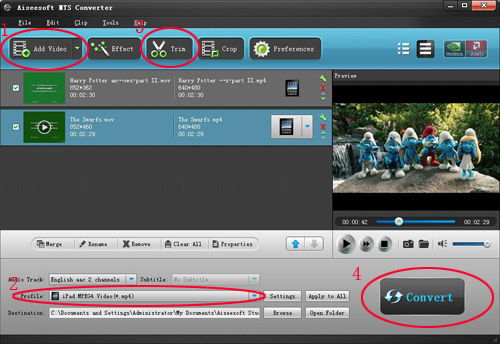
Steps:
Step 1: Load Video
Click “Add File” to load the video that you want.
Step 2: Choose Your Output Profile and Settings
From “Profile” drop-down list you can choose your output profile according to your need.
For example, if you have a iPod and you want to convert video for it, you need to choose “iPod” from the profile list and then it also provides the second chance to specify your iPod generation.
Step 3: Video Editing
This powerful MTS Converter allows you to do many video editing.
Step 4: Conversion
After you have done all the steps above you can click “Start” button to start your conversion.
The excellent software with the similar function are :
M2TS Converter, HD Video Converter.
Well, if , you also want to put the transferred videos from your iPod to your computer or to your friend’s iPod , the iPod Transfer is the best choice for you . It can easily transfer data between my iPod and iPhone, backup iPod data in your computer and put songs and videos from your computer to iPod/iPhone without iTunes.
How to transfer songs and videos from iPod to your computer, from computer to iPod and from iPod to iPod.
Click “Computer to iPod” button, it will allow you to transfer songs and videos from your computer to iPod easily.
Click “iPod to Computer” button, it will allow you to backup your songs and videos from iPod to your computer.
Click “iPod to iPod” button, it will allow you to transfer songs and videos from one iPod to another iPod dirrectly.
Therefore, it is really necessary to read the following article that will answer all your questions, solve your problems. Most importantly, an ideal method will be offered to you.
High-definition video or HD video refers to any video system of higher resolution than standard-definition (SD) videos, and most commonly involves display resolutions of 1280×720 pixels (720p) or 1920×1080 pixels (1080i/1080p). By using the HD Camcorder, such as, Canon HR10 Camcorder, JVC Everio GZHD7 , Sony HDR-HC1 MiniDV, people can get extremely high quality videos. As the video you record on your camcorder is MTS, TS, M2TS or other HD video format which can not be accepted by some popular portable players, so you have to convert them into normal video format to edit. Here I am will willing to share with you
how to convert MTS, TS, M2TS video to normal video formats. The following are the excellent tools.
MTS Converter
Steps:
Step 1: Load Video
Click “Add File” to load the video that you want.
Step 2: Choose Your Output Profile and Settings
From “Profile” drop-down list you can choose your output profile according to your need.
For example, if you have a iPod and you want to convert video for it, you need to choose “iPod” from the profile list and then it also provides the second chance to specify your iPod generation.
Step 3: Video Editing
This powerful MTS Converter allows you to do many video editing.
Step 4: Conversion
After you have done all the steps above you can click “Start” button to start your conversion.
The excellent software with the similar function are :
M2TS Converter, HD Video Converter.
Well, if , you also want to put the transferred videos from your iPod to your computer or to your friend’s iPod , the iPod Transfer is the best choice for you . It can easily transfer data between my iPod and iPhone, backup iPod data in your computer and put songs and videos from your computer to iPod/iPhone without iTunes.
How to transfer songs and videos from iPod to your computer, from computer to iPod and from iPod to iPod.
Click “Computer to iPod” button, it will allow you to transfer songs and videos from your computer to iPod easily.
Click “iPod to Computer” button, it will allow you to backup your songs and videos from iPod to your computer.
Click “iPod to iPod” button, it will allow you to transfer songs and videos from one iPod to another iPod dirrectly.
2011年12月22日星期四
Aiseesoft Releases Major Update to Video Converter for Mac
Aiseesoft, a top-ranking Windows and Mac Blu-ray/DVD/video converting software provider, announced a major update to Video Converter for Mac last Saturday. With this professional Mac Video Converter, customers can conveniently convert all popular video files, like AVI, MP4, MOV, MKV, WMV, FLV, DivX, XviD, MPEG-1/2, 3GP, VOB, HD TS, HD MTS, HD M2TS, etc. on Mac.
The new version of this Video Converter for Mac brings customers many wonderful new features:
- Qt development framework
- More user-friendly graphical interface
- Support 5.1 surround sound
- Improve the "Merge" feature
- Support DE, CUE and WebM file
- Support outputting video without audio track
- Support adjusting output file volume
- Renew the output profile
- Support adjusting output video aspect ratio
This is a totally free update for all old users of this software and the former user name and registration code are still valid. All new customers are also welcome to free download this amazing Video Converter for Mac to have a try.
Aiseesoft Video Converter for Mac, professional video converting software designed for Mac users, can assist users to convert all video files on Mac. With it, customers can conveniently enjoy any movie on portable devices, such as iPad, iPhone, iPod touch, smart phone, PSP, and so on. And this Mac video converting software also owns powerful video editing features. For instance, it can crop video frame, cut off any video segment, add watermark to any video, adjust video effect and join video clips together.
System Requirements
OS Supported: Mac OS X v10.4 – v10.7
Hardware Requirements: 512MB RAM, Super VGA (800×600) resolution, 16-bit graphics card or higher.
About Aiseesoft Studio
As a professional multimedia software provider, Aiseesoft Studio is dedicated to developing the best multimedia desktop applications to help the Windows and Mac users smoothly convert, edit and transfer various video/audio files. In order to meet users' various requirements, Aiseesoft Studio constantly brings in new ideas, technologies, etc.2011年12月20日星期二
How to Copy DVD/ISO image/DVD Folder to DVD/ISO image/DVD Folder for Windows/Mac
When you have bunches of DVD movies, it is really hard to take care of them. The disc is really easy to break. So make a copy of your DVD movies to another DVD disc or ISO image or DVD Folder. How?
When you have bunches of DVD movies, your friends must come and borrow your movies to watch. How to protect your movie disc from being broken? Borrow them a copy?
How?
When your family have a party and it is really sweet, everyone wants to have a copy of the party's video. But they make only one DVD of it. How to make everyone has the record of the happy time? Copy the DVD.
How?
These problems are easy to solve now, if you have this powerful DVD Copy Software.
It can help you to make copys of your DVD. If you want to backup your DVD movies, you can choose to copy the full disc or the main movie. It can also copy a DVD to ISO image and DVD Folder on your computer. Also it can copy your ISO image or DVD Folder to a DVD disc to play in DVD player.
Here is a simple guide for you to follow:
For Windows users:
Step 1 Choose Source:
The source of this DVD copy software can be:
1: DVD disc
2: ISO image
3: DVD Folder
Tip 1: The specific information of the DVD disc will be shown on the top-left of the interface.
Step 2. Preparation
Before you click the “Start” button,
1. You can choose to copy the full disc or the main movie.
2. You can choose the audio, subtitle of the copy.
3. You can change the name of the volume.
4. You can choose to “include menu” or “skip menu” or neither of them.
Step 3. Choose Target:
You can save your DVD movie as:
1: DVD disc
2: DVD Folder
3: ISO Image File
Step 4: Start Copy
Click “Start” button to start the copy.
Tip 2:
You can change the “Preference”, when you click “Edit” button.
For Mac users:
This DVD Copy for Mac software is the best DVD copy for Mac users.
Let's begin to copy DVDs:
Step 1: Download and install DVD Copy for Mac
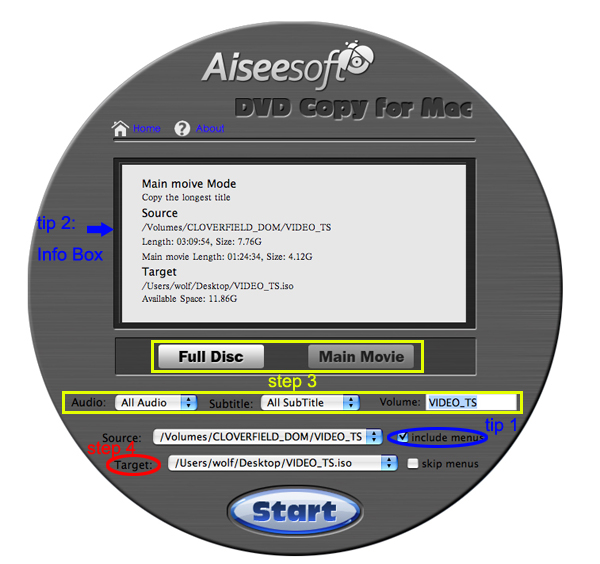
Step 2: Load Your Source
This excellent DVD copy for Mac allows you to load DVD folder and DVD image ISO.
Step 3: Choose Output Info
1. “Full Disc” or “Main Movie”
This DVD copy for Mac enables you to copy the full disc and also the main movie according to your need.
2. “Audio”, “Subtitle” and “Volume” name
You can choose your output audio from the “Audio” drop-down list, such as “all audio”/ “None”/ or some audio the DVD provide.
Subtitle is always an important thing, you can choose your output subtitle in “Subtitle” drop-down list.
You can also name your output volume's name
Step 4: Choose Your Target
You can copy your DVD to another DVD disc, DVD folder or DVD image ISO.
Tips:
1. You can also choose to copy the menus or not.
2. All the info you choose will be displayed on the “Info Box”.
When you have bunches of DVD movies, your friends must come and borrow your movies to watch. How to protect your movie disc from being broken? Borrow them a copy?
How?
When your family have a party and it is really sweet, everyone wants to have a copy of the party's video. But they make only one DVD of it. How to make everyone has the record of the happy time? Copy the DVD.
How?
These problems are easy to solve now, if you have this powerful DVD Copy Software.
It can help you to make copys of your DVD. If you want to backup your DVD movies, you can choose to copy the full disc or the main movie. It can also copy a DVD to ISO image and DVD Folder on your computer. Also it can copy your ISO image or DVD Folder to a DVD disc to play in DVD player.
Here is a simple guide for you to follow:
For Windows users:
Step 1 Choose Source:
The source of this DVD copy software can be:
1: DVD disc
2: ISO image
3: DVD Folder
Tip 1: The specific information of the DVD disc will be shown on the top-left of the interface.
Step 2. Preparation
Before you click the “Start” button,
1. You can choose to copy the full disc or the main movie.
2. You can choose the audio, subtitle of the copy.
3. You can change the name of the volume.
4. You can choose to “include menu” or “skip menu” or neither of them.
Step 3. Choose Target:
You can save your DVD movie as:
1: DVD disc
2: DVD Folder
3: ISO Image File
Step 4: Start Copy
Click “Start” button to start the copy.
Tip 2:
You can change the “Preference”, when you click “Edit” button.
For Mac users:
This DVD Copy for Mac software is the best DVD copy for Mac users.
Let's begin to copy DVDs:
Step 1: Download and install DVD Copy for Mac
Step 2: Load Your Source
This excellent DVD copy for Mac allows you to load DVD folder and DVD image ISO.
Step 3: Choose Output Info
1. “Full Disc” or “Main Movie”
This DVD copy for Mac enables you to copy the full disc and also the main movie according to your need.
2. “Audio”, “Subtitle” and “Volume” name
You can choose your output audio from the “Audio” drop-down list, such as “all audio”/ “None”/ or some audio the DVD provide.
Subtitle is always an important thing, you can choose your output subtitle in “Subtitle” drop-down list.
You can also name your output volume's name
Step 4: Choose Your Target
You can copy your DVD to another DVD disc, DVD folder or DVD image ISO.
Tips:
1. You can also choose to copy the menus or not.
2. All the info you choose will be displayed on the “Info Box”.
2011年12月19日星期一
Aiseesoft Studio's Got Something to Share: Watch DVD on Mac Without DVD Player
Are you into movies? Have you watched the newly released movie - Cars 2, Disney's Pixar animation DVD movie? Do you want to watch this DVD movie on your portable media player instead of having to use a DVD player? Certainly, without a DVD driver, you can't do this. You may need a third party application to help you deal with DVDs released with Digital Copy Protection.
Here's a good assistant - DVD Ripper for Mac helps you decrypt any Digital Copy Protection and rip all DVDs on Mac to any format you need, thus you can watch DVD movies anytime and anywhere.
This DVD Ripper for Mac is an all-in-one DVD Ripper for Mac tool, which allows Mac users to rip DVD to various formats, including MP4, AVI, WMV, 3GP, MOV, DivX video and MP3, M4A, AAC, WAV, OGG, APE audio. If you want to put output video on iPod, just choose MP4, MOV or M4V as video format. This DVD Ripper for Mac is compatible with many portable devices, no matter if you possess iPod touch, iPod nano, iPhone, iPad, iPad 2, Apple TV, PSP, Pocket PC, BlackBerry, PS3 or other players.
As the best Mac DVD Ripper software, it also provides you a series of powerful and easy to use movie edit functions such as video trimming, video cropping, video effect adjustment and video merging, etc. Also, you can select any subtitle and audio track for your output video. More features are waiting for you to try.
Price and Availability
Aiseesoft DVD Ripper for Mac is now priced at $ 35.00
System Requirements
Processor: Intel® processor
OS Supported: Mac OS X 10.4 or above
Hardware Requirements: 512MB RAM, Super VGA (800×600) resolution, 16-bit graphics card or higher
2011年12月18日星期日
For Reasons for Apple to Launch The 7.85 inch iPad
On this Friday, there was a rumor from Apple supply chain that Apple will launch the 7.85 inch Tablet PC in late 2012. The technology blog GigaOm make a analysis why Apple should promote the small dimension Tablet PC.

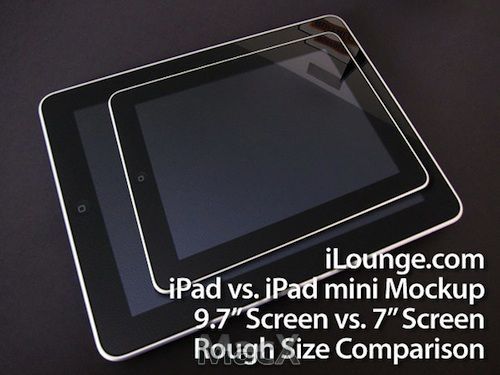
Imaginary 7 inch iPad
Athough Apple is leading the Consumer Tablet PC market, and sales of iPad are far above Android Tablet PC, there are still four reasons why Aplle should launch the smaller screen Tablet PC.
First, Smaller Tablet PC is more portable
The smaller size tablet PC with higher frequency of ultilization, can be used in more situations. For example, the Samsung 7 inch Galaxy Tab tablet PC can be carried with you, but iPad is inconvenient in carrying. When the users sit in the yard, or go to Starbucks, iPad can well meet your needs. But in the process of moving, 7 inch flat panel computer is more convenient. The tablet can be packed in your pants or jacket pocket, but iPad can't. Smaller size also makes weight lighter.
Second, Outstanding 7 inch Tablet PC has already been available
Although 7 inch Galaxy Tab brings much convenience, there are still some disadvantages compared with iPad. However, some better 7 inch Tablet PCs have been available such as bookstore Nook tablet PC and Amazon's Kindle Fire tablet PC. The two products are very popular in this Christmas season. Portability is one of advantages, but more important is the lower price. These 7 inch flat panel computers sell for $199 to $249. Although these tablets can only provide 80% functions of iPad, the price occupies only 40% of it. Maybe Aplle will not throw away the market to Bookstore and Amazon manufactures.
Third, iPod Touch has been less attractive than ever
Some people think that since iPod Tough exists, there is no necessary for Apple to launch the smaller iPad, but this is just one of the reasons that Apple should launch the smaller iPad. As Apple communicates with more and more Operators, consumers are purchasing iPhone more, leading the iPod Touch sales gradually slide down. Some Android mobile phone users may purchase iPod Touch as a supplement, but iPhone users will not do so. Recently, the investment put into iPod Touch is less and less, among the product line update items only increases the white version. This suggests that, as one product line, iPod Touch is gradually towards the end.
Fourth, Price of the smaller iPad can be reduced to the level of iPod Touch
If Apple eventually gave up iPod Touch, it will be lack of products whose price is from 199 to 399 dollars. Apple can launch the small size iPad, whose price is $199, to compete with Kindle Fire. Similar to iPod Touch and the current iPad, the $199 iPad can be the product of WiFi version unrelated to operators, and with 3G module version, the price will be improved. To those consumers, who wish to obtain iPad experience and think price of $499 is too high, 199 to $399 products will meet their needs. Industry insiders guess that, the price of smaller size iPad may be associated with iPod Touch, while the larger storage capacity will have the higher price. Although the launch of small size iPad is appropriate, it does not mean that the current 10 inch iPad is not good. However, the small size iPad has a living space. The best opportunity for Apple to launch the small size iPad will be in September, 2012, the traditional iPod conference. This will help Apple develop better the next Christmas market.
iPad Converter
Imaginary 7 inch iPad
Athough Apple is leading the Consumer Tablet PC market, and sales of iPad are far above Android Tablet PC, there are still four reasons why Aplle should launch the smaller screen Tablet PC.
First, Smaller Tablet PC is more portable
The smaller size tablet PC with higher frequency of ultilization, can be used in more situations. For example, the Samsung 7 inch Galaxy Tab tablet PC can be carried with you, but iPad is inconvenient in carrying. When the users sit in the yard, or go to Starbucks, iPad can well meet your needs. But in the process of moving, 7 inch flat panel computer is more convenient. The tablet can be packed in your pants or jacket pocket, but iPad can't. Smaller size also makes weight lighter.
Second, Outstanding 7 inch Tablet PC has already been available
Although 7 inch Galaxy Tab brings much convenience, there are still some disadvantages compared with iPad. However, some better 7 inch Tablet PCs have been available such as bookstore Nook tablet PC and Amazon's Kindle Fire tablet PC. The two products are very popular in this Christmas season. Portability is one of advantages, but more important is the lower price. These 7 inch flat panel computers sell for $199 to $249. Although these tablets can only provide 80% functions of iPad, the price occupies only 40% of it. Maybe Aplle will not throw away the market to Bookstore and Amazon manufactures.
Third, iPod Touch has been less attractive than ever
Some people think that since iPod Tough exists, there is no necessary for Apple to launch the smaller iPad, but this is just one of the reasons that Apple should launch the smaller iPad. As Apple communicates with more and more Operators, consumers are purchasing iPhone more, leading the iPod Touch sales gradually slide down. Some Android mobile phone users may purchase iPod Touch as a supplement, but iPhone users will not do so. Recently, the investment put into iPod Touch is less and less, among the product line update items only increases the white version. This suggests that, as one product line, iPod Touch is gradually towards the end.
Fourth, Price of the smaller iPad can be reduced to the level of iPod Touch
If Apple eventually gave up iPod Touch, it will be lack of products whose price is from 199 to 399 dollars. Apple can launch the small size iPad, whose price is $199, to compete with Kindle Fire. Similar to iPod Touch and the current iPad, the $199 iPad can be the product of WiFi version unrelated to operators, and with 3G module version, the price will be improved. To those consumers, who wish to obtain iPad experience and think price of $499 is too high, 199 to $399 products will meet their needs. Industry insiders guess that, the price of smaller size iPad may be associated with iPod Touch, while the larger storage capacity will have the higher price. Although the launch of small size iPad is appropriate, it does not mean that the current 10 inch iPad is not good. However, the small size iPad has a living space. The best opportunity for Apple to launch the small size iPad will be in September, 2012, the traditional iPod conference. This will help Apple develop better the next Christmas market.
iPad Converter
2011年12月17日星期六
Microsoft's New OneNote and Lync Apps for iPad, iPhone
On December 12, Microsoft released the new OneNote app for iPad and an updated app for other iOS devices like iPhone, iPod touch, etc. Meanwhile, Microsoft made available its Lync 2010 client app for Windows Phone, and the new Lync clients for iPhone, iPad, Android and Nokia Symbian have been submitted to their respective mobile app marketplaces and will be available as soon as they have been approved.
"Since the launch of OneNote for iPhone nearly a year ago, a recurring request from our customers has been for a version that can be used more easily on the iPad's larger screen," Microsoft said in a blog post. "We're happy to announce that today's new release of OneNote for iOS devices includes a version that's tailored for the iPad." Microsoft updated the app with better navigation, table viewing and performance. More significantly, Microsoft released a whole new version that fills up the greater real estate on an iPad screen. Previously, iPad users would have to use a blown-up version of the iPhone OneNote app, which didn't look very appealing and wasn't optimized for a larger device.
OneNote notebooks are stored via Microsoft SkyDrive. "Your own cloud-based SkyDrive account lets you easily sync all of your notebooks across all of your devices, so they're always up-to-date and accessible from virtually anywhere on your iPhone, your iPad, your Web browser, or your computer," Microsoft said. Today's 1.3 update provides support for the iPad and iPad 2. Other new features, which also apply to the iPhone, include: localization into several new languages and markets; tabbed user interface; quick note creation in the Unfiled Notes section; table rendering; improved Windows Live sign-in experience; the option to sync notebooks only over a Wi-Fi connection; and integrated upgrade option.
Lync, the Microsoft's successor to Office Communications Server, is the Microsoft's unified communications platform that the company launched a year ago. Lync provides enterprise instant-messaging, VOIP and conferencing. There is also a Microsoft-hosted version of Lync that is available as a standalone service and part of Office 365 that is known as Lync Online. According to the Microsoft, the new Lync mobile client allows instant messaging, call-related features and audio conferencing using a Lync ID, which is dependent on an organization having Lync 2010 Server installed. The mobile client must be provisioned by the Lync server administrator first, and that will enable users to download and begin using the various Lync 2010 mobile apps, a Microsoft unified communications team blog explained.
However, Apple devices must be running iOS 4.3 or higher to access OneNote 1.3, and users must sign up for a free Windows Live account. The app is free to download and users get up to 500 free notes. After that, it's $4.99 for unlimited use on the iPhone and $14.99 for unlimited use on the iPad. Meanwhile, if you were hoping for more official word today on some kind of Microsoft Office suite on the iPad, don't hold your breath. Microsoft still are not commenting on rumors that Office for the iPad will be out in some form in 2012.
DVD to iPhone Converter. iPad Transfer2011年12月15日星期四
Microsoft releases SkyDrive App for Windows phone and iPhone
Microsoft's love affair with iOS isn't over yet. It was OneNote and a “real soon now” commitment on its Lync unified-communications client for the iPad this Monday. Microsoft also announced this week that its Kinectimals game is available for the iPad and iPhone. On December 13, Microsoft made yet another Apple-focused announcement: An iOS version of SkyDrive for iPhone.
Users of Microsoft's SkyDrive cloud storage service now have another way to access and share their files – the newly released SkyDrive App for both Windows phone and iOS devices, which are intended to complement SkyDrive.com's existing mobile interface. "As devices proliferate, having a great experience on the Web is only one piece of a pretty complex puzzle," Microsoft's Mike Torres wrote. "People are choosing where to put their files based on how portable and accessible they are across the various devices they use, therefore, it's critical that we continue to extend the SkyDrive experience to the devices you use every day."
Microsoft's Mike Torres said: "Many still want the full SkyDrive experience from Windows phone, including tasks like browsing their entire SkyDrive, sharing links to folders or files, deleting files, and creating folders." The SkyDrive App allows you to view all of the files and folders in your SkyDrive and those that have been shared with you by others. You can view documents and pictures, create and delete folders, delete files, email links to files and folders (giving recipients either read-only or read-and-write permissions to the file), and download and upload pictures. Moving and renaming files and folders don’t appear to be possible on either platform, however. As a result, phones running Windows Phone 7.5 can now download the SkyDrive App from the Windows phone Marketplace and do just that. For those on iOS, the same app was also released in the App Store.
SkyDrive is a potential competitor in the mobile consumer space with Apple's iCloud, which is available for free with iOS 5. Microsoft's SkyDrive efforts appear to be part of its general market push into a world of connected devices that will increasingly be mobile. It also squares with the "three-screens and a cloud" vision laid out when Ray Ozzie was Microsoft's chief software architect. The idea is to synchronized data across devices. SkyDrive is already facilitating that, in part, by enabling single sign-on capabilities across devices.
Microsoft explained late last month that it has made sharing via SkyDrive more "app-centric." It already enables document collaborations via some of its Office Web Apps, although its "coauthoring" feature used with the Word Web App doesn't exactly work in real time. Other improvements made earlier this year to SkyDrive include simplifications to accessing folder directories and a speeded-up photo browsing experience, as well as the use of AJAX and HTML 5 technologies to improve the user experience. Microsoft has explained that some of the SkyDrive features it built earlier were just too complex, but it is listening to customer feedback and making improvements.
iPad Transfer, iPhone TransferBack-glances of iOS Development, iOS 1、2、3、4、5
On January 10, 2007, Steve Jobs demonstrated a new intelligent mobile phone---iPhone, as well as the iOS system, which has changed history.
At that time Windows Mobile、Palm OS、Symbian and BlackBerry OS were all active on the mobile stage.
The first generation of iPhone did not support 3G, didn't support the third-app, didn't support copy and paste text, didn't support multiple tasks, didn't support email attachments, didn't support MMS, Exchange, Office Editor and so on.
Now let us together make a five-year-review of iOS from the 2007 when iOS 1 and iPhone were born...
iOS 1

June, 2007---iOS 1.0---First generation of iPhone
Although it was not perfect, it brought much profound impact later
- The core of iOS user interface
- Mobile Safari browser
- A new form of " widescreen" iPod
- Google Map
- Visual voice mail
- ITunes synchronization
- Virtual keyboard
September, 2007 -- iOS 1.1 -- iPhone 1 / iPod touch 1
- iTunes Wi-Fi music store
- iPod touch compatible
January, 2008 -- iOS 1.1.3
- better positioning
- Set webpage shortcut icon on main screen
- Re-layout icon
- Multi point touch keyboard
iOS 2

iOS 2, from July, 2008, created a new era, i'm not wrong, just App Store.
At the beginning it took use of iTunes music users, and now becomes most popular program store, App Store created value for Apple and developers, and brought a full range of intelligent mobile phone experience.
July, 2008 -- iOS 2 -- iPhone 1, 3G; iPod touch 1
- local third party programs
- App Store
- Support Microsoft Exchange
- MobileMe
- Search contacts
September, 2008 -- iOS 2.1 -- iPhone 1, 3G iPod touch1, 2;
- Improve battery life and speed
- iTunes Genius playlist
- line repair
2008 November -- iOS 2.2 -- iPhone 1, 3G iPod touch1, 2;
- Google Street View
- Podcast Download
iOS 3

IOS 3.0 is an era when functions outbroke, iPhone began to support the 3G network, its lack of functions got a full complement, and added many local features, leting iPhone play more intelligently in life.
June, 2009 -- iOS 3 -- iPhone1, 3G, 3GS; iPod touch 1, 2
- cut, paste, copy
- Voice control
- MMS information
- Spotlight search
- push notification
- USB and Bluetooth connection
Lateral keyboard
- Find My iPhone
September, 2009 -- iOS 3.1 -- iPhone1, 3G, 3GS; iPod touch, 1, 2, 3
- Genius function
- ringtones download
- Remote locking
- Control through blue tooth speech
iOS 4

In June, 2010, the arrival of the iOS 4 brought more functions, Apple will always add the needs point by point to surprise us, for example the multi task switching, if lack this function now, will you hold on?
June, 2010 -- iOS 4 -- iPhone 3G, 3GS, 4; iPod touch 2, 3
- Multi task
- Folder
- FaceTime Contact
- Unified mail inbox
- Multi - thread message
- Retina HD display technology
- Support iAd advertising
iOS 5

Now iOS 5 is in front of your eyes, iPhone 4S Siri voice assistant, iMessage, notify the center and other new features that we are beginning to experience and the time is not so long, and iCloud cloud storage.
Do you feel the release conference is visible?
October, 2011 -- iOS 5 -- iPhone 3GS, 4, 4S iPad 1, 2; 3, 4; iPod touch
- Siri voice
- Notification Center
- free PC
- iTunes Wi-Fi synchronization
- iMessage
- iCloud
This article is posted by iPad Video Converter Club.
At that time Windows Mobile、Palm OS、Symbian and BlackBerry OS were all active on the mobile stage.
The first generation of iPhone did not support 3G, didn't support the third-app, didn't support copy and paste text, didn't support multiple tasks, didn't support email attachments, didn't support MMS, Exchange, Office Editor and so on.
Now let us together make a five-year-review of iOS from the 2007 when iOS 1 and iPhone were born...
iOS 1
June, 2007---iOS 1.0---First generation of iPhone
Although it was not perfect, it brought much profound impact later
- The core of iOS user interface
- Mobile Safari browser
- A new form of " widescreen" iPod
- Google Map
- Visual voice mail
- ITunes synchronization
- Virtual keyboard
September, 2007 -- iOS 1.1 -- iPhone 1 / iPod touch 1
- iTunes Wi-Fi music store
- iPod touch compatible
January, 2008 -- iOS 1.1.3
- better positioning
- Set webpage shortcut icon on main screen
- Re-layout icon
- Multi point touch keyboard
iOS 2
iOS 2, from July, 2008, created a new era, i'm not wrong, just App Store.
At the beginning it took use of iTunes music users, and now becomes most popular program store, App Store created value for Apple and developers, and brought a full range of intelligent mobile phone experience.
July, 2008 -- iOS 2 -- iPhone 1, 3G; iPod touch 1
- local third party programs
- App Store
- Support Microsoft Exchange
- MobileMe
- Search contacts
September, 2008 -- iOS 2.1 -- iPhone 1, 3G iPod touch1, 2;
- Improve battery life and speed
- iTunes Genius playlist
- line repair
2008 November -- iOS 2.2 -- iPhone 1, 3G iPod touch1, 2;
- Google Street View
- Podcast Download
iOS 3
IOS 3.0 is an era when functions outbroke, iPhone began to support the 3G network, its lack of functions got a full complement, and added many local features, leting iPhone play more intelligently in life.
June, 2009 -- iOS 3 -- iPhone1, 3G, 3GS; iPod touch 1, 2
- cut, paste, copy
- Voice control
- MMS information
- Spotlight search
- push notification
- USB and Bluetooth connection
Lateral keyboard
- Find My iPhone
September, 2009 -- iOS 3.1 -- iPhone1, 3G, 3GS; iPod touch, 1, 2, 3
- Genius function
- ringtones download
- Remote locking
- Control through blue tooth speech
iOS 4
In June, 2010, the arrival of the iOS 4 brought more functions, Apple will always add the needs point by point to surprise us, for example the multi task switching, if lack this function now, will you hold on?
June, 2010 -- iOS 4 -- iPhone 3G, 3GS, 4; iPod touch 2, 3
- Multi task
- Folder
- FaceTime Contact
- Unified mail inbox
- Multi - thread message
- Retina HD display technology
- Support iAd advertising
iOS 5
Now iOS 5 is in front of your eyes, iPhone 4S Siri voice assistant, iMessage, notify the center and other new features that we are beginning to experience and the time is not so long, and iCloud cloud storage.
Do you feel the release conference is visible?
October, 2011 -- iOS 5 -- iPhone 3GS, 4, 4S iPad 1, 2; 3, 4; iPod touch
- Siri voice
- Notification Center
- free PC
- iTunes Wi-Fi synchronization
- iMessage
- iCloud
This article is posted by iPad Video Converter Club.
2011年12月14日星期三
Four Major Attractions of The Newly-Launched Aiseesoft DVD Creator.
Through continuous innovation and the day and night's hard work of Aiseesoft Studio's engineers, Aiseesoft Studio has released DVD Creator to welcome the coming Christmas.
Other thighs aside, this DVD Creator can burn videos to nearly all DVD+-R/RW, DVD-RAM, DVD-5(4.5G) and DVD-9(8.5GB) discs. And the created DVD-format disc could be played perfect on most portable and home DVD player.
This is a victory.
There are four major attractions in this program and after you have a try by yourself, maybe you will be astonished.
First Attraction, With it, you can easily preserve your favorite videos like AVI, MPEG, DivX, DV, VOB, WMV, MP4, M2TS, MTS, etc. to DVD-format disc, and also it allows users to burn video to DVD folder and ISO files, which can be stored in local disk.
Second Attraction, Compared with other DVD Movie Creators or DVD Burners, Aiseesoft DVD Creator is more personalized. With it, you can first edit the video effect, such as brightness, saturation, contrast, hue and volume and also you can cut off any video segment and crop the video frame, etc. Thus, you can make your DVD as you wish not like the DVDs in the market that you can only watch them.
Third Attraction, In addition to Edit the video sources effect, you can Customize the DVD menu. There are many beautiful menu templates for users to choose, and certainly, you can prefer that there is no menu in your DVD, if you like the simple template.
After you have chosen the menu template, you can also select the menu frame and button style. Also you can edit the menu text content and define its font, size and color.
Moreover, this software enables you to attach your own background picture/music and opening film to the DVD menu.
Fourth Attraction, This DVD Creator allows users to choose the audio track for the DVD. Besides of the exciting audio track, you can also add your own audio track or background music to the DVD.
You can choose a language to sign the audio track you preferred, adjust the volume, and choose audio encoder/bitrate/channels. If the audio track and the video scenes do not match, you can adjust the audio latency to make the audio track sync with the image of video.
Certainly there are many other creative functions waiting for your discovery.
Please have a try by yourself: http://www.aiseesoft.com/dvd-creator/
Other thighs aside, this DVD Creator can burn videos to nearly all DVD+-R/RW, DVD-RAM, DVD-5(4.5G) and DVD-9(8.5GB) discs. And the created DVD-format disc could be played perfect on most portable and home DVD player.
This is a victory.
There are four major attractions in this program and after you have a try by yourself, maybe you will be astonished.
First Attraction, With it, you can easily preserve your favorite videos like AVI, MPEG, DivX, DV, VOB, WMV, MP4, M2TS, MTS, etc. to DVD-format disc, and also it allows users to burn video to DVD folder and ISO files, which can be stored in local disk.
Second Attraction, Compared with other DVD Movie Creators or DVD Burners, Aiseesoft DVD Creator is more personalized. With it, you can first edit the video effect, such as brightness, saturation, contrast, hue and volume and also you can cut off any video segment and crop the video frame, etc. Thus, you can make your DVD as you wish not like the DVDs in the market that you can only watch them.
Third Attraction, In addition to Edit the video sources effect, you can Customize the DVD menu. There are many beautiful menu templates for users to choose, and certainly, you can prefer that there is no menu in your DVD, if you like the simple template.
After you have chosen the menu template, you can also select the menu frame and button style. Also you can edit the menu text content and define its font, size and color.
Moreover, this software enables you to attach your own background picture/music and opening film to the DVD menu.
Fourth Attraction, This DVD Creator allows users to choose the audio track for the DVD. Besides of the exciting audio track, you can also add your own audio track or background music to the DVD.
You can choose a language to sign the audio track you preferred, adjust the volume, and choose audio encoder/bitrate/channels. If the audio track and the video scenes do not match, you can adjust the audio latency to make the audio track sync with the image of video.
Certainly there are many other creative functions waiting for your discovery.
Please have a try by yourself: http://www.aiseesoft.com/dvd-creator/
2011年12月11日星期日
How to convert DVD to iPod/iPhone/Sansa/PSP/Zune/iRiver/Google Phone/Cell Phone, etc. on Mac
Many people like enjoy movies at home and they have piles of DVDs. So do I. I like watch lastest movie on my new Mac and it is wonderful. However, I always break and lose my DVDs and I was really sad because they cost most of my money. Luckily, I find a way to store my DVD movies on my new Mac computer and evern put it on my iPod because I use a DVD Ripper for Mac and it can rip DVDs to so many video formats, such as AVI, MP4, MOV, MKV, WMV, DivX, XviD, MPEG-1/2, 3GP, 3G2, VOB and so on.
To do this you must have a nice dvd ripper for Mac. So I find Aiseesoft DVD Ripper for Mac
OK, let’s do it.
Step 1. Download and install Aisesoft DVD Ripper for Mac.
For Intel
For Power PC
Step 2. Load you DVD.
Click the “Load DVD” button(a), find the DVD folder of the movie you want to add from your DVD-ROM, and Click “Open”.
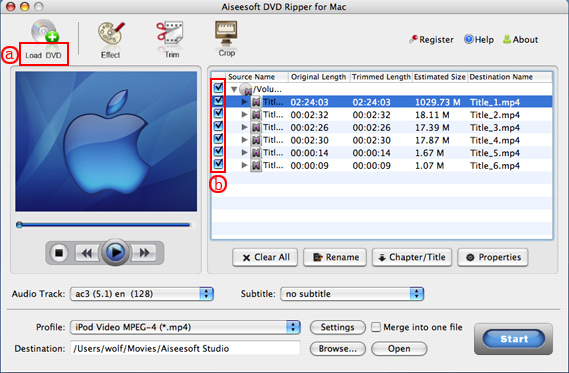
Tick the check boxes(b) before the titles and chapters that you want to rip.
Step 3. Chose output profile and settings.
Selecting output format is really easy, you can chose your output format according to your devices players and the default setting works great.
For a veteran of digital player, you could customize your own settings by clicking “Settings” button to chose your own video resolution, frame rate, bit rate, encoder, etc.
Tips: Sample rate (Hz) = any value up to 48000 (higher value = better sound quality = bigger file)
Bitrate (kbps) = any value up to 160 (higher value = better sound quality = bigger file)
After setting your own output and settings you can click “Start” button to start your conversion. (The time of the conversion depends on your DVD and the settings you chose.)
Do a few more clicks to make your movie more enjoyable.
1. Trim
If you want to rip only a part of the DVD movie, please click “Trim” button and drag the “Start trim slider” to set the start time and “End trim slider” to set the end time.(a). You can also do that by clicking the “Start trim button” and “End trim button”(b). The third way you do that is set the exact Start/End time at the right of the pop-up window and click “OK”.
2. Crop
If you want to remove the black edges or you want to rip a certain area of your video, please click the “Crop” button. You can do this either by drag the frame around the movie (a) or set the crop value: “Top, Left, Bottom, Right”.(b). Another way to do that is choose mode from “Crop Mode”(c).
Aiseesoft DVD Ripper for Mac also allows you to choose the output aspect ratio above the crop pane, “Keep Original, full screen, 16:9 and 4:3” are available.
3. Effect
If you want to adjust the effect of your movie, please click the “Effect” button and a pop-up effect window will appear. It allows you to edit your movie’s effect including “Brightness, Contrast, Hue, Saturation and Volume”.
4. Merge into one file/audio track/subtitles
If you would like to put several titles and chapters into one output file, please tick the check box of the “Merge into one file”.
You can choose audio track and subtitles you like according to what you prefer and the DVD supports.
Follow what I said above I hope you could enjoy your DVD movies on your Mac and also on your iPod and other portable players
To do this you must have a nice dvd ripper for Mac. So I find Aiseesoft DVD Ripper for Mac
OK, let’s do it.
Step 1. Download and install Aisesoft DVD Ripper for Mac.
For Intel
For Power PC
Step 2. Load you DVD.
Click the “Load DVD” button(a), find the DVD folder of the movie you want to add from your DVD-ROM, and Click “Open”.
Tick the check boxes(b) before the titles and chapters that you want to rip.
Step 3. Chose output profile and settings.
Selecting output format is really easy, you can chose your output format according to your devices players and the default setting works great.
For a veteran of digital player, you could customize your own settings by clicking “Settings” button to chose your own video resolution, frame rate, bit rate, encoder, etc.
Tips: Sample rate (Hz) = any value up to 48000 (higher value = better sound quality = bigger file)
Bitrate (kbps) = any value up to 160 (higher value = better sound quality = bigger file)
After setting your own output and settings you can click “Start” button to start your conversion. (The time of the conversion depends on your DVD and the settings you chose.)
Do a few more clicks to make your movie more enjoyable.
1. Trim
If you want to rip only a part of the DVD movie, please click “Trim” button and drag the “Start trim slider” to set the start time and “End trim slider” to set the end time.(a). You can also do that by clicking the “Start trim button” and “End trim button”(b). The third way you do that is set the exact Start/End time at the right of the pop-up window and click “OK”.
2. Crop
If you want to remove the black edges or you want to rip a certain area of your video, please click the “Crop” button. You can do this either by drag the frame around the movie (a) or set the crop value: “Top, Left, Bottom, Right”.(b). Another way to do that is choose mode from “Crop Mode”(c).
Aiseesoft DVD Ripper for Mac also allows you to choose the output aspect ratio above the crop pane, “Keep Original, full screen, 16:9 and 4:3” are available.
3. Effect
If you want to adjust the effect of your movie, please click the “Effect” button and a pop-up effect window will appear. It allows you to edit your movie’s effect including “Brightness, Contrast, Hue, Saturation and Volume”.
4. Merge into one file/audio track/subtitles
If you would like to put several titles and chapters into one output file, please tick the check box of the “Merge into one file”.
You can choose audio track and subtitles you like according to what you prefer and the DVD supports.
Follow what I said above I hope you could enjoy your DVD movies on your Mac and also on your iPod and other portable players
2011年12月9日星期五
Microsoft updates Xbox 360, adding more contents to enrich your life
Microsoft releases a new Xbox 360 dashboard update to all Xbox users in this week, and Xbox uses can enjoy much more contents apart from games. The Xbox console's various channels now headline the top of the screen, listing the familiar "games," "music" and "video" sections between the new Bing search feature and the console's settings page. A few of the channels have been renamed -- "My Xbox" is now "home" and a very Zune-esque "social" replaces "friends." Core content hasn't changed much, but the way you access it has, with yesterday's single-file tiles retired in favor of single page Metro layouts, packing more than twice as much information on screen as the previous Dashboard.
The contemporary update keeps the Metro, heavy on typography and flat squares and live tiles and swiping, the Metro lives in Xbox, Windows Phone 7 and the upcoming Windows 8, it's a fresh yet familiar take on UI. Metro looks so good and easy-to-use whether you already know how to use it or you've never used it before. With Metro on Xbox, Microsoft can elegantly pack more contents onto one screen. A horizontal menu details the various categories on your Xbox (Games, Video, Music, Apps, etc.) with each category getting its own hub organized neatly with independent tiles of content.
In addition, the Xbox companion application is powered by Microsoft’s Bing search engine. The search functionality allows you to search the entire Xbox Live catalog of TV shows, movies, music, games and apps on your Windows Phone device. Once you’ve searched a title, you can find out more information about it, and launch it on your Xbox from your handset, controlling it with the usual play, pause, rewind and fast forward functions we’re all used to. By bundling all digital subscriptions and content through the Xbox 360, Microsoft wants to make sure your gaming console is at the heart of your entertainment center. Xbox Live subscribers and subscribers of these digital services won't have access to much in the way of new content, but it will all be centralized in one location. Microsoft has also baked in deeper voice control of the console for consumers using its Kinect sensor. The Kinect is better known as motion-controller that gives gamers the ability to use gestures to play games. But Kinect also has a microphone array in it. When Kinect debuted last year, gamers could use their voice for some limited voice-controlled navigation.
In a word, the move is part of a growing effort by media companies to bring some 21st-century pizzazz to the experience of navigating and watching television, a medium that is largely watched using traditional remote controls and set-top boxes that have changed little in the past 10 years. Xboxes are already 57 million households worldwide, so the decision to update such a gigantic installed base is a shrewd move on Microsoft’s part. Nonetheless, it remains to be seen whether the Xbox can juice the Windows Phone platform, which could use a serious boost in adoption.
Microsoft will open Windows store for Metro-style Windows 8 App in February
Microsoft on Tuesday brought its Windows 8 road show to San Francisco, where the company previewed its upcoming Windows Store for app developers and media. They will open the online marketplace for Metro-style Windows 8 application in late February 2012. The key ingredients of the Windows Store are easy app discovery from within and without the online marketplace, built-in app trials with quick upgrade paths, support for both x86 and ARM-based hardware, and a flexible business model, Microsoft's Antoine Leblond said.
With Apple's Mac App Store and iTunes Store already operational and selling both computer and tablet applications, Microsoft is keen to highlight the differences and promises to make an application store that was more flexible, more transparent, and ultimately more lucrative for developers than Apple's. The Windows Store will make it easy for Windows customers to find, try and buy useful, high-quality apps from practically anywhere in the world. With code-named "Windows 8" and the Windows Store, developers can enjoy a built-in distribution and update mechanism for their apps. Built using HTML5 and JavaScript, the Windows Store is a fast, fluid, full-screen Metro-style app taking advantage of the Metro-style design principles inspired in Windows 8. Easy to build for, submit to and sell through, the Windows Store is designed with app discoverability and visibility in mind. The Windows Store will open its virtual doors to consumers and begin allowing for submission of free apps for Windows 8 Beta in late February next year.
The Windows Store will support both free and paid applications, with paid applications ranging from $1.49 to $999. As with Microsoft's Windows Phone Marketplace, developers can offer free trials, with integrated support for converting trials to full versions. Microsoft will provide its own advertising and in-app purchase infrastructure, but these will be strictly optional, if a developer wants to use a different ad network, or its own subscription and billing system, that's not a problem. With a standard validation process that developers can use even before they make their submission and an online tracker that tells them which phase their application is in and how long they can expect the process to take. But money is, for many developers, the most important feature of any online store. The Windows Store will take a 30 percent cut of application sales, just like Apple's store.
The Windows Store follows the path of Apple's Mac App Store, a software marketplace that's built into Mac OS X. That's provided a way for customers to quickly download both free and paid applications for their computers. Microsoft will offer the app marketplace around the world. Leblond said it will support more than 100 languages in 231 different markets. With the dominant operating system software as a lure, the Windows Store could evolve into a meaningful revenue generator for the company, which rang up just shy of $70 billion in the last fiscal year.
Total Video Converter | Video Converter for Mac2011年12月8日星期四
Google Chairman Eric Schmidt said: “Android has been leading Apple iPhone”.
Google Cairman Eric Schmidt said today, in intelligent mobile phone market, Android has already been ahead of the Apple iPhone.


Google Cairman Eric Schmidt
Today Schmidt at the LeWeb meeting in Paris said: "Android is now ahead of the iPhone." After Schmidt published the speech, that room is filled with the iPhone, iPad and Mac. Having heard Schmidt's remark, the audience suddenly fell into silent for a moment. Maybe they doubt on Schmidt's speech.
Schmidt then gives his own criteria:" huge volume, high performance Android 4.0, lower price, as well as many mobile phone manufacturers’ support."
Industry insiders said, in the intelligent mobile phone market, Android is developing rapidly. But compared with Apple iOS, the obvious disadvantage is Android has not become the preferred platform for developers. Notebook application developer Evernote today only released a new application Hello for iPhone.
Social News reader Flipboard has already launched iPhone application. Flipboard CEO Mike McCue said:" We have been concerned about the iPhone. As with the Android version, we are still waiting."
Schmidt believed that, with the Android 4.0 and huge volume, Android will win. Schmidt said: "in the end, application developers will be affected by the volume, and Google's open strategy will promote the shipment growth. So many manufacturers promote Android mobile phones to the world, whether they like it or not, people will support this platform, even considering it as the preferred platform."
This Article is reproduced from iPad Converter Suite Club
Google Cairman Eric Schmidt
Today Schmidt at the LeWeb meeting in Paris said: "Android is now ahead of the iPhone." After Schmidt published the speech, that room is filled with the iPhone, iPad and Mac. Having heard Schmidt's remark, the audience suddenly fell into silent for a moment. Maybe they doubt on Schmidt's speech.
Schmidt then gives his own criteria:" huge volume, high performance Android 4.0, lower price, as well as many mobile phone manufacturers’ support."
Industry insiders said, in the intelligent mobile phone market, Android is developing rapidly. But compared with Apple iOS, the obvious disadvantage is Android has not become the preferred platform for developers. Notebook application developer Evernote today only released a new application Hello for iPhone.
Social News reader Flipboard has already launched iPhone application. Flipboard CEO Mike McCue said:" We have been concerned about the iPhone. As with the Android version, we are still waiting."
Schmidt believed that, with the Android 4.0 and huge volume, Android will win. Schmidt said: "in the end, application developers will be affected by the volume, and Google's open strategy will promote the shipment growth. So many manufacturers promote Android mobile phones to the world, whether they like it or not, people will support this platform, even considering it as the preferred platform."
This Article is reproduced from iPad Converter Suite Club
2011年12月7日星期三
How to Rip DVD to iPad 2?
Enjoying DVD movie on iPad 2 would be a tough task as the iPad 2 cannot play DVD. However, with Aiseesoft DVD to iPad 2 Converter, users can conveniently enjoy any DVD movie on your iPad 2. This DVD to iPad 2 Converter is professional DVD to iPad 2 Ripper to rip any DVD to iPad 2 video and audio formats with perfect output quality and amazing converting speed.
First, you need to download the installation package of DVD to iPad 2 Converter and install it. Then you can see the interface as below.

Step 1: Load DVD
You can input any DVD disc, DVD folder, or DVD IFO file to this DVD to iPad 2 Converter.
Step 2: Edit video effect
If you are not satisfied with the original DVD movie effect, you can customize it with the built-in video editing features. It enables users to trim video length, crop video playing area, adjust video aspect ratio, modify video brightness, saturation and contrast, etc. You can click the relevant button to do all these editing.
Step 3: Choose audio track and subtitle
Usually, the DVD movie has more than one audio track and subtitle. You can choose your preferred one with this DVD to iPad 2 Converter.
Step 4: Adjust output settings
With this DVD to iPad 2 Ripper, you can adjust Video Encoder, Frame Rate, Video Bitrate, Resolution, Audio Encoder, Sample Rate, Channels, and Audio Bitrate. Also you can input your own solution.
Step 5: Choose output profile
Aiseesoft DVD to iPad 2 Converter can rip DVD to abundant of output formats. You need to choose one from the profile drop-down list according to your need. Then you can press the "Convert" button to start ripping DVD to iPad 2.
First, you need to download the installation package of DVD to iPad 2 Converter and install it. Then you can see the interface as below.
Step 1: Load DVD
You can input any DVD disc, DVD folder, or DVD IFO file to this DVD to iPad 2 Converter.
Step 2: Edit video effect
If you are not satisfied with the original DVD movie effect, you can customize it with the built-in video editing features. It enables users to trim video length, crop video playing area, adjust video aspect ratio, modify video brightness, saturation and contrast, etc. You can click the relevant button to do all these editing.
Step 3: Choose audio track and subtitle
Usually, the DVD movie has more than one audio track and subtitle. You can choose your preferred one with this DVD to iPad 2 Converter.
Step 4: Adjust output settings
With this DVD to iPad 2 Ripper, you can adjust Video Encoder, Frame Rate, Video Bitrate, Resolution, Audio Encoder, Sample Rate, Channels, and Audio Bitrate. Also you can input your own solution.
Step 5: Choose output profile
Aiseesoft DVD to iPad 2 Converter can rip DVD to abundant of output formats. You need to choose one from the profile drop-down list according to your need. Then you can press the "Convert" button to start ripping DVD to iPad 2.
2011年12月6日星期二
How to convert backup iPhone, convert DVD/video, make iPhone ringtone.
From the first generation of iPhone on June 29, 2007 in USA to the lasted iPhone 3G S, iPhone have become an irreplaceable assistant of our daily life. We use iPhone to contact with friends, deal with Email, find information on the internet, watch youtube video, and so on. How to make your iPhone more enjoyable? Here I recommend you a really powerful iPhone software Pack. It can help you to put your DVD movies and videos you have one your iPhone, it can also backup your iPhone info, also it can make your own iPhone ringtone from your music and videos.
Part 1: How to convert your DVD movies to your iPhone use DVD to iPhone Converter
Step 1: Load DVD
Put your DVD in your DVD Drive and click “Load DVD” button
Step 2: Choose output profile and Settings
You can choose your output profile in the drop-list when you click profile list.
You can also adjust your settings, such as Resolution, Bitrate, so on.
Step 3: Edit Video
You can do “Trim”, “Crop”, “Merge into one file”and other video editing functions to make your video more enjoyable.
Click “Start” to begin you conversion. After few mins you can enjoy your DVD movies on your iPhone.
Part 2: How to Converter your videos to iPhone use iPhone video converter
Step 1: Add file
Click “Add File” button to add your video you want to put on your iPhone.
Step 2: Choose output profile and settings
You can choose your output profile in the drop-list when you click profile list.
You can also adjust your settings, such as Resolution, Bitrate and Encoder and so on.
Part 3: How to transfer Backup iPhone info with iPhone Transfer
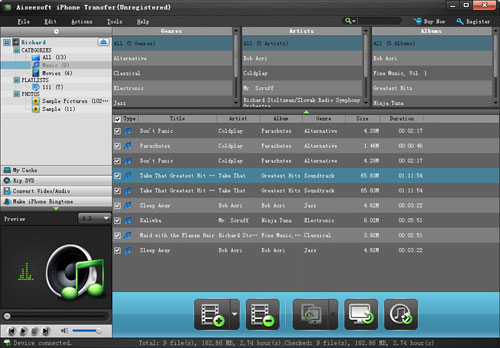
Step 1: Click iPhone Transfer
Click “Computer to iPhone”(1) button, it will allow you to transfer songs and videos from your computer to iPhone easily.
Click “iPhone to Computer”(2) button, it will allow you to backup your songs and videos from iPhone to your computer.
Click “iPhone to iPhone”(3) button, it will allow you to transfer songs and videos from one iPhone to another iPhone dirrectly.
Part 4: How to make your own iPhone ringtone
Step 1: Click iPhone Rigntone Maker and click “Browse” on the right side of "Input File" to import the file that you want to make ringtone from it.
Step 2: Play it and listen the music to find the segment that you want to use it as ringtone. Then drag and click the start & end slider to set your wanted segment, or type the start & end time in the corresponding text box directly to get the exact segment. You also can pre-listen the converted audio before generate.
Step 3: Click “Browse” on the right side of "Local Output Folder" to choose the output destination.
Step 4: Check "Export to iPhone" option, the converted ringtone will be load to your iPhone directly.
Step 5: After all the settings are finished, click “Generate” to begin making your own iPhone ringtone.
For Mac users I recommend you iPhone Software Pack for Mac
Functions:
1.Converter DVD to iPhone video format.
2.Converter Videos to iPhone video format.
3.Backup iPhone music and videos to your Mac
4.Make your own iPhone ringtone from your music and videos.
Part 1: How to convert your DVD movies to your iPhone use DVD to iPhone Converter
Step 1: Load DVD
Put your DVD in your DVD Drive and click “Load DVD” button
Step 2: Choose output profile and Settings
You can choose your output profile in the drop-list when you click profile list.
You can also adjust your settings, such as Resolution, Bitrate, so on.
Step 3: Edit Video
You can do “Trim”, “Crop”, “Merge into one file”and other video editing functions to make your video more enjoyable.
Click “Start” to begin you conversion. After few mins you can enjoy your DVD movies on your iPhone.
Part 2: How to Converter your videos to iPhone use iPhone video converter
Step 1: Add file
Click “Add File” button to add your video you want to put on your iPhone.
Step 2: Choose output profile and settings
You can choose your output profile in the drop-list when you click profile list.
You can also adjust your settings, such as Resolution, Bitrate and Encoder and so on.
Part 3: How to transfer Backup iPhone info with iPhone Transfer
Step 1: Click iPhone Transfer
Click “Computer to iPhone”(1) button, it will allow you to transfer songs and videos from your computer to iPhone easily.
Click “iPhone to Computer”(2) button, it will allow you to backup your songs and videos from iPhone to your computer.
Click “iPhone to iPhone”(3) button, it will allow you to transfer songs and videos from one iPhone to another iPhone dirrectly.
Part 4: How to make your own iPhone ringtone
Step 1: Click iPhone Rigntone Maker and click “Browse” on the right side of "Input File" to import the file that you want to make ringtone from it.
Step 2: Play it and listen the music to find the segment that you want to use it as ringtone. Then drag and click the start & end slider to set your wanted segment, or type the start & end time in the corresponding text box directly to get the exact segment. You also can pre-listen the converted audio before generate.
Step 3: Click “Browse” on the right side of "Local Output Folder" to choose the output destination.
Step 4: Check "Export to iPhone" option, the converted ringtone will be load to your iPhone directly.
Step 5: After all the settings are finished, click “Generate” to begin making your own iPhone ringtone.
For Mac users I recommend you iPhone Software Pack for Mac
Functions:
1.Converter DVD to iPhone video format.
2.Converter Videos to iPhone video format.
3.Backup iPhone music and videos to your Mac
4.Make your own iPhone ringtone from your music and videos.
2011年12月5日星期一
Time to Throw Away Your iTunes
Everyone who has a iPhone or iPod is using itunes definitely. However, does everyone like it? Does everyone think it is convenient? Does everyone really want to use it if they have a substitute that is more easier to use and can do much more for your iPhone and iPod? I think everyone wants to replace it because it has too many limitations and it serves apple but not people who has a iPhone or iPod. Now it is the time to throw away your itunes. Because you have this iPhone transfer and iPod transfer.
This powerful iPhone Transfer can help you to import songs/videos/images from your computer to iPhone. It can also backup your iPhone music/videos/images to your computer or external hard dirve. Most important, it can help you to put your DVD movies and videos/movies you download from internet and the format is not supported by iPhone to iPhone easily. It can also help you to make iPhone rigntones for iPhone users from video/dvd/music they have.
OK, only from what I said you may not fall in love with it immediately. Let's see how it works for you.
Part 1: How to Import DVD Movies/Videos/Songs/Images to iPhone
Step 1: Connect iPhone
Plug your iPhone to your computer via USB cable, it can automatically find your iPhone, load your iPhone info and show the info at the left of its interface. (It works the same as itunes.)
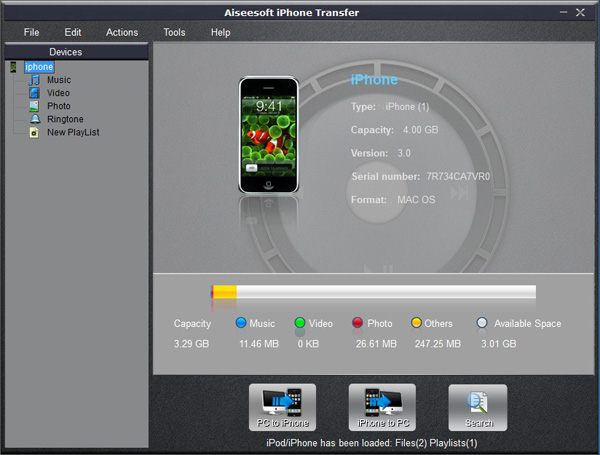
Step 2: Import to iPhone
A. Import DVD movies to iPhone (iTunes does not allow you to do this)
1.Select “Movie” in the left list and then click “PC to iPhone” button at the bottom of the interface, you will see a conversion and import window.
2.Put your DVD movies in your DVD Drive and Click “Load DVD” button to load the movies.
3.You can choose “Audio track” and “Subtitles” of the output movies, if you do not want a subtitle just leave it blank. You need also select the output profile and you can select apply to all button to use this output profile forever, if you do not use it some day, you can change it at will.
4.Click “Import” button and it will help you to convert the movies to iPhone video format and then import into your iPhone directly.
Note:
You need to check the box before “convert files before importing”, if not the movies/videos/songs can not be recognized by iPhone and can not be played in iPhone.
B. Import videos/songs to iPhone (iTunes only import certain format videos/songs to iPhone)
1. Select “Video” or “Music” in the left list and then click “PC to iPhone” button and go to the conversion and import window
2. Click “Add File” button to add the video or music to it and you can choose output profile and then click “import” button
Note:
If the videos and songs' format is not supported by iPhone, this powerful iPhone transfer will convert them first and then transfer them into your iPhone. If you have lots of videos or songs it may take longer to transfer them to your iPhone.
C. Import photo/images to iPhone
The process of importing images to iPhone is the same as videos/songs. First you need to select photo in the left list. Second you can select photos to import to your iPhone.
Note:
If you import a photo you do not want to you iPhone, you can right click the selected photo and then delete it from iPhone directly.
D. Import and Create Ringotnes to iPhone (iTunes can only import but not create)
1.Select Ringtone on the left list
2.Click “PC to iPhone” button and you will go to the make ringtone and import window.
3.Here this powerful iPhone transfer allows you to create ringtones for iPhone from DVD/Movie/Video/Music.
4.After you load a video, music or a DVD, you can pick up one part of it as your ringtone. You can pre-listen the ringtone. If not satisfied, change it and re-prelisten it.
5.After you find your right part as your ringtone, click “import” button. It will generate your ringtone and then import to your iPhone directly.
Part 2: How to Backup your iPhone Music/Images/Videos on Computer(iTunes does not allow you to do backup, NEVER!)
Run the software, and connect your iPhone/iPod to your computer via USB cable. After done, the iPhone/iPod icon and its library and playlists will appear in the Device list.
Step 1: Open the library/playlist that you want to export files, and then check the file(s) you want to export in the file list.
Step 2: Click “iPhone to PC” button to select the destination of the exporting files and start exporting files.
OK, you can throw away your itunes NOW!
If you are a Mac user, here are also a realy niceiPhone Transfer for Mac, it can do the same thing as the windows version.
Transfer DVD/Movies/Video/Songs/Images to your iPhone and backup Music, Video, Ringtones, and images to your Mac easily.
Also there is iPod Manager for Mac for Mac users. It has the same function as the iPhone transfer for mac.
This powerful iPhone Transfer can help you to import songs/videos/images from your computer to iPhone. It can also backup your iPhone music/videos/images to your computer or external hard dirve. Most important, it can help you to put your DVD movies and videos/movies you download from internet and the format is not supported by iPhone to iPhone easily. It can also help you to make iPhone rigntones for iPhone users from video/dvd/music they have.
OK, only from what I said you may not fall in love with it immediately. Let's see how it works for you.
Part 1: How to Import DVD Movies/Videos/Songs/Images to iPhone
Step 1: Connect iPhone
Plug your iPhone to your computer via USB cable, it can automatically find your iPhone, load your iPhone info and show the info at the left of its interface. (It works the same as itunes.)
Step 2: Import to iPhone
A. Import DVD movies to iPhone (iTunes does not allow you to do this)
1.Select “Movie” in the left list and then click “PC to iPhone” button at the bottom of the interface, you will see a conversion and import window.
2.Put your DVD movies in your DVD Drive and Click “Load DVD” button to load the movies.
3.You can choose “Audio track” and “Subtitles” of the output movies, if you do not want a subtitle just leave it blank. You need also select the output profile and you can select apply to all button to use this output profile forever, if you do not use it some day, you can change it at will.
4.Click “Import” button and it will help you to convert the movies to iPhone video format and then import into your iPhone directly.
Note:
You need to check the box before “convert files before importing”, if not the movies/videos/songs can not be recognized by iPhone and can not be played in iPhone.
B. Import videos/songs to iPhone (iTunes only import certain format videos/songs to iPhone)
1. Select “Video” or “Music” in the left list and then click “PC to iPhone” button and go to the conversion and import window
2. Click “Add File” button to add the video or music to it and you can choose output profile and then click “import” button
Note:
If the videos and songs' format is not supported by iPhone, this powerful iPhone transfer will convert them first and then transfer them into your iPhone. If you have lots of videos or songs it may take longer to transfer them to your iPhone.
C. Import photo/images to iPhone
The process of importing images to iPhone is the same as videos/songs. First you need to select photo in the left list. Second you can select photos to import to your iPhone.
Note:
If you import a photo you do not want to you iPhone, you can right click the selected photo and then delete it from iPhone directly.
D. Import and Create Ringotnes to iPhone (iTunes can only import but not create)
1.Select Ringtone on the left list
2.Click “PC to iPhone” button and you will go to the make ringtone and import window.
3.Here this powerful iPhone transfer allows you to create ringtones for iPhone from DVD/Movie/Video/Music.
4.After you load a video, music or a DVD, you can pick up one part of it as your ringtone. You can pre-listen the ringtone. If not satisfied, change it and re-prelisten it.
5.After you find your right part as your ringtone, click “import” button. It will generate your ringtone and then import to your iPhone directly.
Part 2: How to Backup your iPhone Music/Images/Videos on Computer(iTunes does not allow you to do backup, NEVER!)
Run the software, and connect your iPhone/iPod to your computer via USB cable. After done, the iPhone/iPod icon and its library and playlists will appear in the Device list.
Step 1: Open the library/playlist that you want to export files, and then check the file(s) you want to export in the file list.
Step 2: Click “iPhone to PC” button to select the destination of the exporting files and start exporting files.
OK, you can throw away your itunes NOW!
If you are a Mac user, here are also a realy niceiPhone Transfer for Mac, it can do the same thing as the windows version.
Transfer DVD/Movies/Video/Songs/Images to your iPhone and backup Music, Video, Ringtones, and images to your Mac easily.
Also there is iPod Manager for Mac for Mac users. It has the same function as the iPhone transfer for mac.
2011年12月4日星期日
Newly Upgraded Aiseesoft iPad Converter - Highly Supports iOS 5
Aiseesoft, one of the professional developers of digital multimedia software, has garnered long-time support from their loyal customers. In order to serve them better, Aiseesoft Studio upgraded their popular iPad Converter, and now it highly supports iOS 5, iPhone 4S, and iPad 2.
On the basis of transferring music, movie, pictures, TV shows, Podcasts, iTunes U, eBooks, Camera Roll, voice memos, camera shots from iPad to PC or from PC to iPad, this upgrade enables Aiseesoft iPad Transfer to highly support the latest iPhone 4S, iPad 2 and iOS 5. Besides, it brings users 6x faster converting speed due to the application of AMD APP and NVIDIA® CUDA™ GPU processing acceleration technology in DVD to iPad Converter and iPad Video Converter software.
As for iPad Converter Suite, it is composed of DVD to iPad Converter, iPad Video Converter and iPad Transfer. Thus, it should be your best choice to convert any DVD file or video to general output formats such as MPEG-4, H.264/MPEG-4 AVC, MOV, and M4V for iPad in fast speed and excellent qualities and transfer files between PC and iPad to share or backup whilst saving money. Besides, this iPad Converter Suite supports all versions of iPod/iPhone/iPad.
To conclude, the Aiseesoft iPad Converter Suite is an extremely useful tool to convert DVD / video to all video and audio formats supported by Apple Devices as you like. It is also the best assistant to manage your iPad files well. Give it a try it today!
Price and Availability
iPad Converter Suite is now priced at $ 35.00
System Requirements
OS Supported: Windows NT4/2000/2003/XP and Windows Vista, Windows 7
Hardware Requirements: 800MHz Intel or AMD CPU, or above; 512MB RAM or more
2011年12月2日星期五
The Competition of Indoor Navigation
I believe most of you have the same experience that I have. When you fist step in a new building, airport or school, you will feel loss and do not know what to do first and where to go. For example, you are in a hospital. It is difficult for you to find the place you want to go. Many hospital use a not that effective way to solve this problem, of course, it does not work at most of the time. They just set different kinds of sign post or just use different colors to guide people. However, now we have a really nice way to solve this problem, using intelligent map system in mobile phone. It makes it's easy to find some places in a building and other indoor places.
In the latest Android map, it includes US IKEA and Macy's and other 18 airport's detailed layout. Almost at the same time, Nokia announced they will release indoor map suing Bluetooth 4.0. Although use two totally different technology, we can smell that the war of indoor map is already begin.
For a long time, Bluetooth has a poor reputation. It maybe because that the headphone looks not like a human or something else. It makes people feel weird. However, Bluetooth is actually a really nice technology: powerful, simple, cheap. And it will be much more smart after the release of Bluetooth 4.0. Nokia's Location Extension Protocol uses the connection of locator transmitter on the ceiling and Bluetooth 4.0. And triangulation method that is similar to GPS. Through this way, your mobile phone can find the place you want to go accurately. It is said that the degree of precision is less than 8 inches.
Nokia has spent over one billion euros and hope this breakthrough technology will bring superority in the competiton of indoor map. They have also discovered the different application of this tech, from game to indoor navigation. Nokia is now trying their best to persuade Bluetooth SIG to make one uniform standard and hope this kind of mobile phone can come out into market in 2013.
Just like that if there is no specific map, GPS can not work, the indoor navigation system can not work without a detailed architectural and structural drawings. Now Google allows uses to upload or add architectural and structural drawings to Google Maps as they do the same to SketchUp. This is a simple process, users just need upload the picture of the floor's layout and then connect with satellite images of Google Maps. Through this way, Google not only gets many users' support, uploading indoor maps data day and night, they also uses the data for other users, such as services based on location and ads based on location.
What I have said above is not considering the crime, privacy and other safe question. People are now really sensitive to Google Street View. I believe this kind of indoor map data will bring bigger controversy. In conclusion, we need indoor navigation when we are in a strange building to find places fast. However, we need to use it carefully. Hope Google and Nokia will solve these problems and provide us indoor navigation one day.
iPod to Mac | DVD to iPad2011年12月1日星期四
How to Enjoy Your Favorite Videos on Portable Devices at Will For Mac Users
Are you a Mac user?
Do you still feel frustrated that you can’t enjoy your favorite videos on portable devices at will?
Now, a professional software—Aiseesoft
Video Converter for Mac
can help you to solve all the problems. With it, you can convert between all popular video and audio formats with super fast conversion speed and high output quality, such as AVI, MP4, MOV, MKV, WMV, DivX, XviD, MPEG-1/2, 3GP, 3G2, VOB Video, MP3, AAC, and AC3 Audio etc. In addition, the best video converter for Mac can also extract audio from video file and convert video to MP3, AC3, and AAC…as you want.
OK, let’s move to how to use the amazing software.
Step 0: Download and install Aiseesoft Video Converter for Mac.
After a while, you can use the following interface:
Step 2. Load Video
You can load your video by clicking “Add File” button or clicking “File” button, you can choose “add file” on a drop-down list.
Step 3. Output format and Settings
From the “Profile” drop-down list you can find one format that meets your requirement.
After doing the 3 steps above, you can click “start” button to start conversion.
Wait a minute, the conversion will be soon finished.
Tips:
1. Trim
"Trim" function is for you to select the clips you want to convert.
There are 3 ways that you can trim your video.
a. You can drag the buttons(1) to set the start and end time
b. You can preview the video first and when you want to start trim click the left one of the pair buttons(2) when you want to end click the right one.
c. You can set the exact start and end time on the right side of the pop-up window.
It is for you to select the clips you want to convert.
2. Crop
Cut off the black edges of the original movie video and watch in full screen using the "Crop" function.
There are 3 ways that you can crop your video.
a. We provide 7 modes on our “Crop Mode”(1)
b. You can set your own mode on the right side of the pop-up window(2)
c. You can drag frame to set your own crop mode(3)
You can cut off the black edges of the original movie video and watch in full screen using the "Crop" function.
3. Snapshot and merge into one file
If you like the current image of the video you can use the “Snapshot” option. Just click the “Snapshot” button the image will be saved and you can click the “Open” button next to “Snapshot” button to open your picture.
If you want to make several files output as one you can choose “Merge into one file”.
If you are windows users, you can go to Aiseesoft Total Video Converter to get more information.
Do you still feel frustrated that you can’t enjoy your favorite videos on portable devices at will?
Now, a professional software—Aiseesoft
Video Converter for Mac
can help you to solve all the problems. With it, you can convert between all popular video and audio formats with super fast conversion speed and high output quality, such as AVI, MP4, MOV, MKV, WMV, DivX, XviD, MPEG-1/2, 3GP, 3G2, VOB Video, MP3, AAC, and AC3 Audio etc. In addition, the best video converter for Mac can also extract audio from video file and convert video to MP3, AC3, and AAC…as you want.
OK, let’s move to how to use the amazing software.
Step 0: Download and install Aiseesoft Video Converter for Mac.
After a while, you can use the following interface:
Step 2. Load Video
You can load your video by clicking “Add File” button or clicking “File” button, you can choose “add file” on a drop-down list.
Step 3. Output format and Settings
From the “Profile” drop-down list you can find one format that meets your requirement.
After doing the 3 steps above, you can click “start” button to start conversion.
Wait a minute, the conversion will be soon finished.
Tips:
1. Trim
"Trim" function is for you to select the clips you want to convert.
There are 3 ways that you can trim your video.
a. You can drag the buttons(1) to set the start and end time
b. You can preview the video first and when you want to start trim click the left one of the pair buttons(2) when you want to end click the right one.
c. You can set the exact start and end time on the right side of the pop-up window.
It is for you to select the clips you want to convert.
2. Crop
Cut off the black edges of the original movie video and watch in full screen using the "Crop" function.
There are 3 ways that you can crop your video.
a. We provide 7 modes on our “Crop Mode”(1)
b. You can set your own mode on the right side of the pop-up window(2)
c. You can drag frame to set your own crop mode(3)
You can cut off the black edges of the original movie video and watch in full screen using the "Crop" function.
3. Snapshot and merge into one file
If you like the current image of the video you can use the “Snapshot” option. Just click the “Snapshot” button the image will be saved and you can click the “Open” button next to “Snapshot” button to open your picture.
If you want to make several files output as one you can choose “Merge into one file”.
If you are windows users, you can go to Aiseesoft Total Video Converter to get more information.
2011年11月30日星期三
Newly Upgraded Aiseesoft iPad Converter - Highly Supports iOS 5
Aiseesoft, one of the professional developers of digital multimedia software, has garnered long-time support from their loyal customers. In order to serve them better, Aiseesoft Studio upgraded their popular iPad Transfer, and now it highly supports iOS 5, iPhone 4S, and iPad 2.
On the basis of transferring music, movie, pictures, TV shows, Podcasts, iTunes U, eBooks, Camera Roll, voice memos, camera shots from iPad to PC or from PC to iPad, this upgrade enables Aiseesoft iPad Transfer to highly support the latest iPhone 4S, iPad 2 and iOS 5. Besides, it brings users 6x faster converting speed due to the application of AMD APP and NVIDIA® CUDA™ GPU processing acceleration technology in DVD to iPad Converter and iPad Video Converter software.
As for iPad Converter Suite, it is composed of DVD to iPad Converter, iPad Video Converter and iPad Transfer. Thus, it should be your best choice to convert any DVD file or video to general output formats such as MPEG-4, H.264/MPEG-4 AVC, MOV, and M4V for iPad in fast speed and excellent qualities and transfer files between PC and iPad to share or backup whilst saving money. Besides, this iPad Converter Suite supports all versions of iPod/iPhone/iPad.
To conclude, the Aiseesoft iPad Converter Suite is an extremely useful tool to convert DVD / video to all video and audio formats supported by Apple Devices as you like. It is also the best assistant to manage your iPad files well. Give it a try it today!
Price and Availability
iPad Converter Suite is now priced at $ 35.00
System Requirements
OS Supported: Windows NT4/2000/2003/XP and Windows Vista, Windows 7
Hardware Requirements: 800MHz Intel or AMD CPU, or above; 512MB RAM or more
2011年11月28日星期一
How to Convert DVD and Video to Any Video Format You Want Freely
Convert DVD and video is really easy for most of people now. You just need a DVD converter and a video converter. Use dvd converter to convert your DVD and use video converter to convert video. Do you want only one converter that can help you to convert both DVD and video in one interface with few clicks and high output quality. Today I will introduce you a Total Media Converter that convert both DVD and video.
You need to download and install it first before you can use it.
Step 1: Load DVD/Video
Click “Add File” to load Videos from your computer
Click “Load DVD” to load your DVD from your DVD Drive
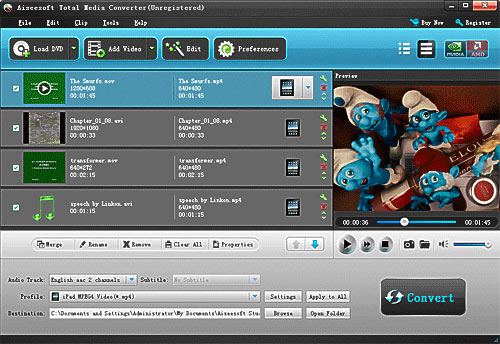
Step 2: Choose Output Info
a. Convert video:
Choose output profile first in the drop-down list and then click “settings” button to adjust the specific settings, such as “resolution”, “encoder”, “bit rate”, “frame rate” and some audio settings such as “audio encoder”, “sample rate” and so on. You can save your profile and settings and give it a name, so you can use it next time easily.
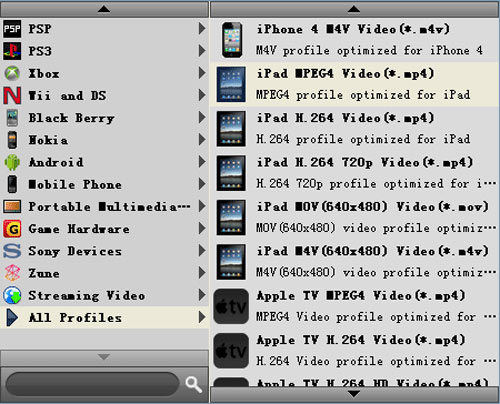
b. Convert DVD
Choose output profile first and then you need to choose your output audio track and subtitle, if you do not want them you can leave them blank. Also like convert video you can adjust the specific output settings, such as “resolution”, “bit rate” and so on.
Save the profile and settings for next use is also available.
Step 3: Conversion
Click “Convert” button to start your conversion. You will get your output video soon.
Tips:
1. Adjust the output effect
You are allowed to adjust the “Brightness”, “Contrast” and “Saturation” of the output video. “Deinterlacing” is also available to improve the quality of the output video. You can choose “apply to all” to save your time.
2. Pick up a part to convert
If you do not want to convert the whole video or DVD you can just pick up the part that you want to convert using “Trim” function.
You can do it in 3 ways:
a: Enter the start time in the Start Time box and click OK, then enter the end time in the Set End Time box and click OK.
b: Drag the scissors bars under the preview window when you want to trim, then the time will be shown in the Start Time box and End Time box for your reference.
c: While playing video, click “Trim From” button where you want to begin your trimming and click “Trim To” button where you want to stop your trimming.
3. Crop the output video
This powerful video converter allows you to crop the video play area. You can choose a certain play area to convert, and do snapshot.
You can crop your output video in 2 ways:
a: Crop by adjusting the crop frame
The crop frame is the yellow line around the movie video. There are eight small adjustment boxes on the crop frame. Each adjustment box allows you to crop the movie video from a different position. To crop your movie video, you can just move your mouse cursor to an adjustment box and drag the crop frame.
b: Crop by setting the crop values
There are four crop values on the buttom of the window: Left, Top, Right, Bottom. You can set each value to crop your movie video, and the crop frame will move accordingly.
You can also set the output aspect ratio from the Zoom Mode according to your need. There are four choices available: Keep Original, Full Screen, 16:9 and 4:3.
4. Add watermark to the output video
You can add text and picture watermark to your output video easily with Aiseesoft Total Media Converter.
Check the “Enable Watermark” box and choose “Text” or “Picture” as you want.
You can drag the watermark to find the place you want to put and also you can adjust the Font info of the words you from “T” button.
You need to download and install it first before you can use it.
Step 1: Load DVD/Video
Click “Add File” to load Videos from your computer
Click “Load DVD” to load your DVD from your DVD Drive
Step 2: Choose Output Info
a. Convert video:
Choose output profile first in the drop-down list and then click “settings” button to adjust the specific settings, such as “resolution”, “encoder”, “bit rate”, “frame rate” and some audio settings such as “audio encoder”, “sample rate” and so on. You can save your profile and settings and give it a name, so you can use it next time easily.
b. Convert DVD
Choose output profile first and then you need to choose your output audio track and subtitle, if you do not want them you can leave them blank. Also like convert video you can adjust the specific output settings, such as “resolution”, “bit rate” and so on.
Save the profile and settings for next use is also available.
Step 3: Conversion
Click “Convert” button to start your conversion. You will get your output video soon.
Tips:
1. Adjust the output effect
You are allowed to adjust the “Brightness”, “Contrast” and “Saturation” of the output video. “Deinterlacing” is also available to improve the quality of the output video. You can choose “apply to all” to save your time.
2. Pick up a part to convert
If you do not want to convert the whole video or DVD you can just pick up the part that you want to convert using “Trim” function.
You can do it in 3 ways:
a: Enter the start time in the Start Time box and click OK, then enter the end time in the Set End Time box and click OK.
b: Drag the scissors bars under the preview window when you want to trim, then the time will be shown in the Start Time box and End Time box for your reference.
c: While playing video, click “Trim From” button where you want to begin your trimming and click “Trim To” button where you want to stop your trimming.
3. Crop the output video
This powerful video converter allows you to crop the video play area. You can choose a certain play area to convert, and do snapshot.
You can crop your output video in 2 ways:
a: Crop by adjusting the crop frame
The crop frame is the yellow line around the movie video. There are eight small adjustment boxes on the crop frame. Each adjustment box allows you to crop the movie video from a different position. To crop your movie video, you can just move your mouse cursor to an adjustment box and drag the crop frame.
b: Crop by setting the crop values
There are four crop values on the buttom of the window: Left, Top, Right, Bottom. You can set each value to crop your movie video, and the crop frame will move accordingly.
You can also set the output aspect ratio from the Zoom Mode according to your need. There are four choices available: Keep Original, Full Screen, 16:9 and 4:3.
4. Add watermark to the output video
You can add text and picture watermark to your output video easily with Aiseesoft Total Media Converter.
Check the “Enable Watermark” box and choose “Text” or “Picture” as you want.
You can drag the watermark to find the place you want to put and also you can adjust the Font info of the words you from “T” button.
2011年11月27日星期日
Newly Upgraded Aiseesoft iPad Converter - Highly Supports iOS 5
Aiseesoft, one of the professional developers of digital multimedia software, has garnered long-time support from their loyal customers. In order to serve them better, Aiseesoft Studio upgraded their popular iPad Video Converter, and now it highly supports iOS 5, iPhone 4S, and iPad 2.
On the basis of transferring music, movie, pictures, TV shows, Podcasts, iTunes U, eBooks, Camera Roll, voice memos, camera shots from iPad to PC or from PC to iPad, this upgrade enables Aiseesoft iPad Transfer to highly support the latest iPhone 4S, iPad 2 and iOS 5. Besides, it brings users 6x faster converting speed due to the application of AMD APP and NVIDIA® CUDA™ GPU processing acceleration technology in DVD to iPad Converter and iPad Video Converter software.
As for iPad Converter Suite, it is composed of DVD to iPad Converter, iPad Video Converter, and iPad Transfer. Thus, it should be your best choice to convert any DVD file or video to general output formats such as MPEG-4, H.264/MPEG-4 AVC, MOV, and M4V for iPad in fast speed and excellent qualities and transfer files between PC and iPad to share or backup whilst saving money. Besides, this iPad Converter Suite supports all versions of iPod/iPhone/iPad.
To conclude, the Aiseesoft iPad Converter Suite is an extremely useful tool to convert DVD / video to all video and audio formats supported by Apple Devices as you like. It is also the best assistant to manage your iPad files well. Give it a try it today!
Price and Availability
iPad Converter Suite is now priced at $ 35.00
System Requirements
OS Supported: Windows NT4/2000/2003/XP and Windows Vista, Windows 7
Hardware Requirements: 800MHz Intel or AMD CPU, or above; 512MB RAM or more
订阅:
博文 (Atom)